DRIVER APP SOFTWARE
Taxi Driver App Built for Real Operations
Give drivers one branded place to see eligible work, understand a booking, progress a trip, use configured fare tools and review trip records. Swaggy Info Labs builds driver-side technology for taxi companies, private-hire fleets and ride-hailing operators.
- Bookings and dispatch
- Trip and fare tools
- Driver and vehicle rules
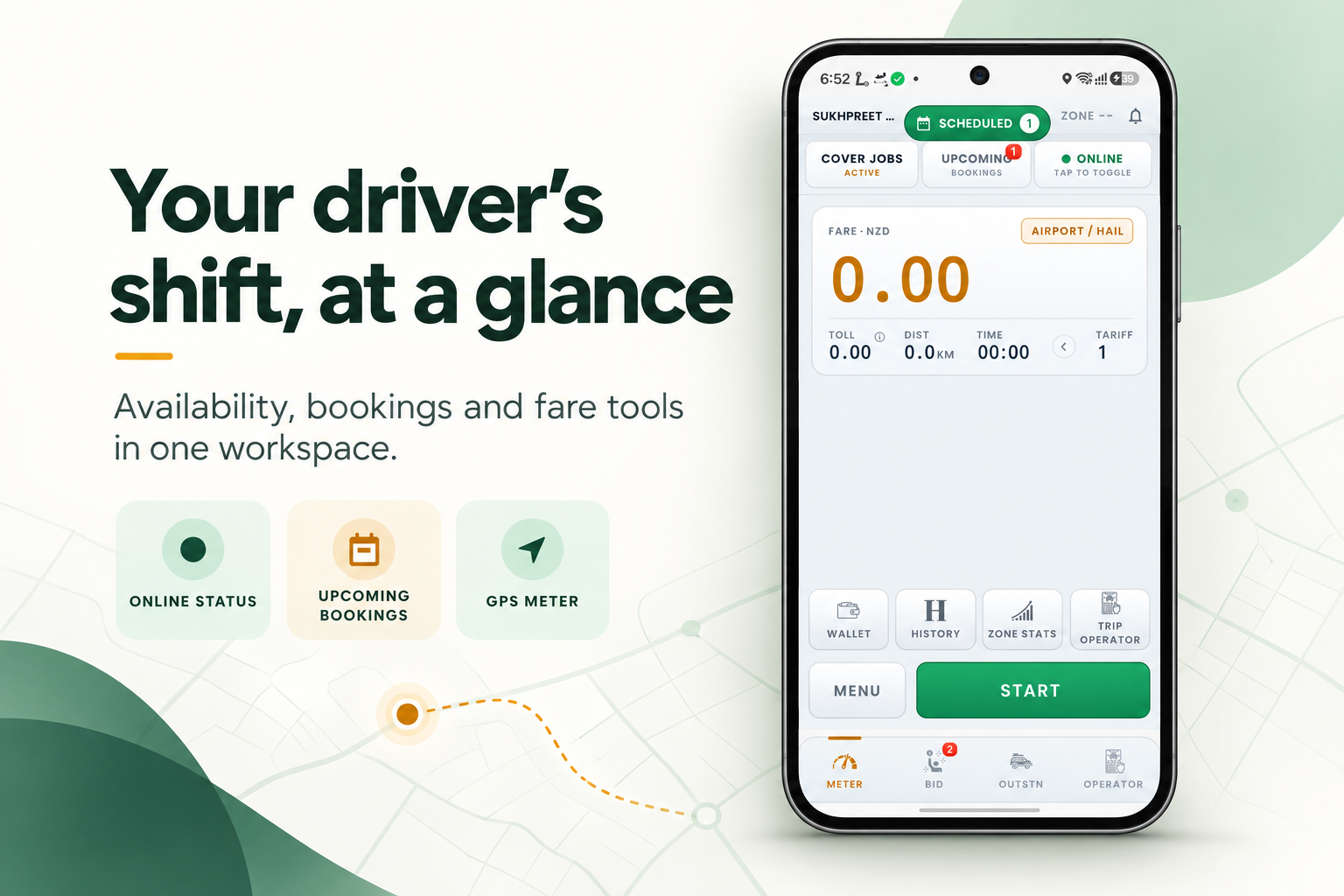
Branding, enabled modules and operating rules are agreed for each deployment.
THE DRIVER'S WORKDAY
A driver app should run the job — not just display it.
Drivers need the next action to be clear, while the operator keeps control of dispatch, driver eligibility, services and fare rules. A taxi dispatch driver app can connect those steps in one working flow.
Check readiness
Review online status, selected vehicle and any configured document or service requirements.
Understand the offer
See relevant booking details, fare context and the action available under the operator's rules.
Progress the trip
Move through pickup, arrival, trip start and completion, with navigation or fare tools where enabled.
Review the record
Check trip, payment, wallet or earnings information supported by the selected deployment.
Location use should follow the client's disclosed safety, dispatch and privacy model, including when a driver is online or completing a booking.
INSIDE THE DRIVER APP
Explore the driver-side workflows.
Browse the supplied Page 05 visuals by task. The complete artwork is shown without cropping; select an image to open the original-size file.
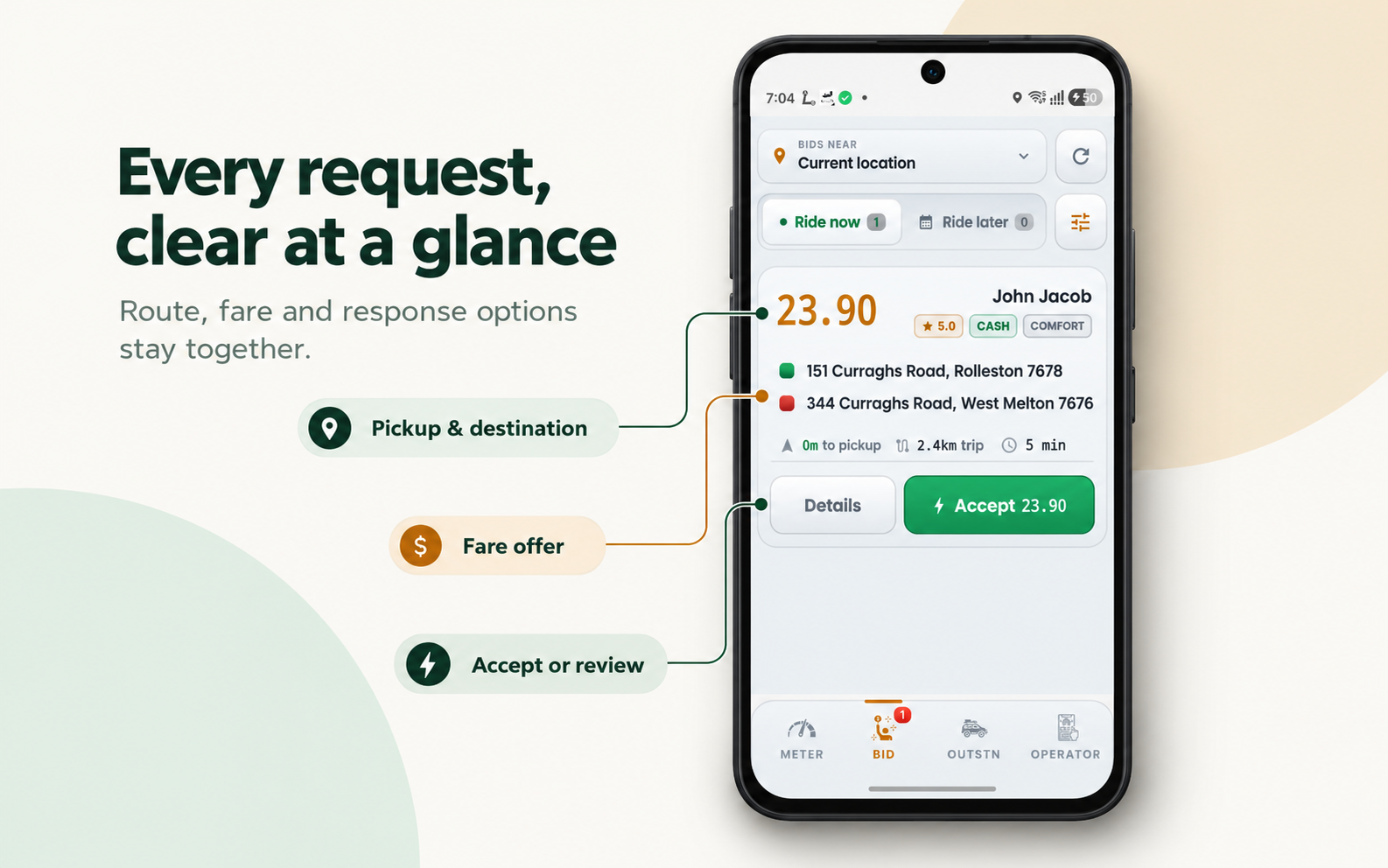
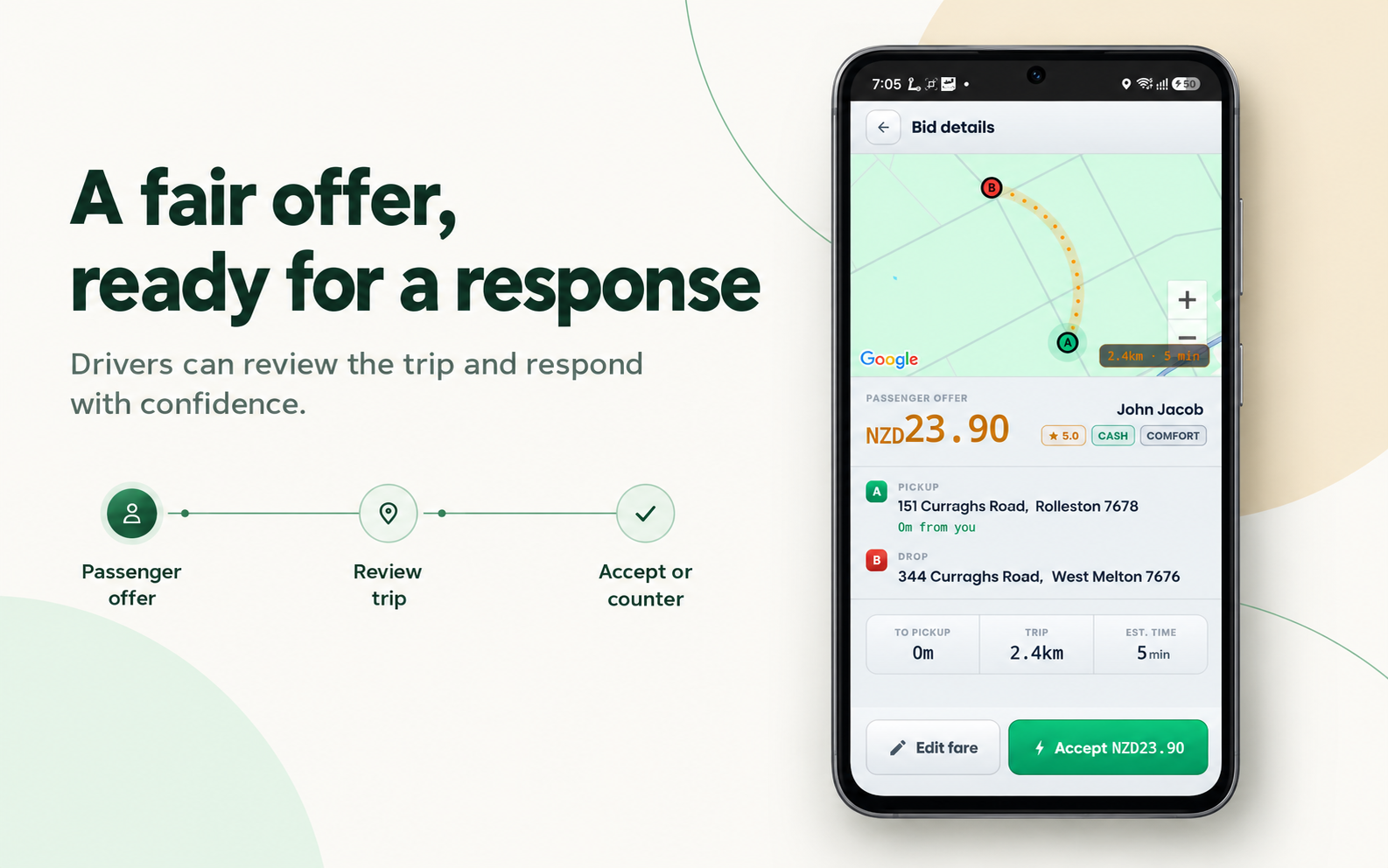
Review the job. Choose the right response.
Booking details and driver actions can reflect the service type, fare model and operator configuration.
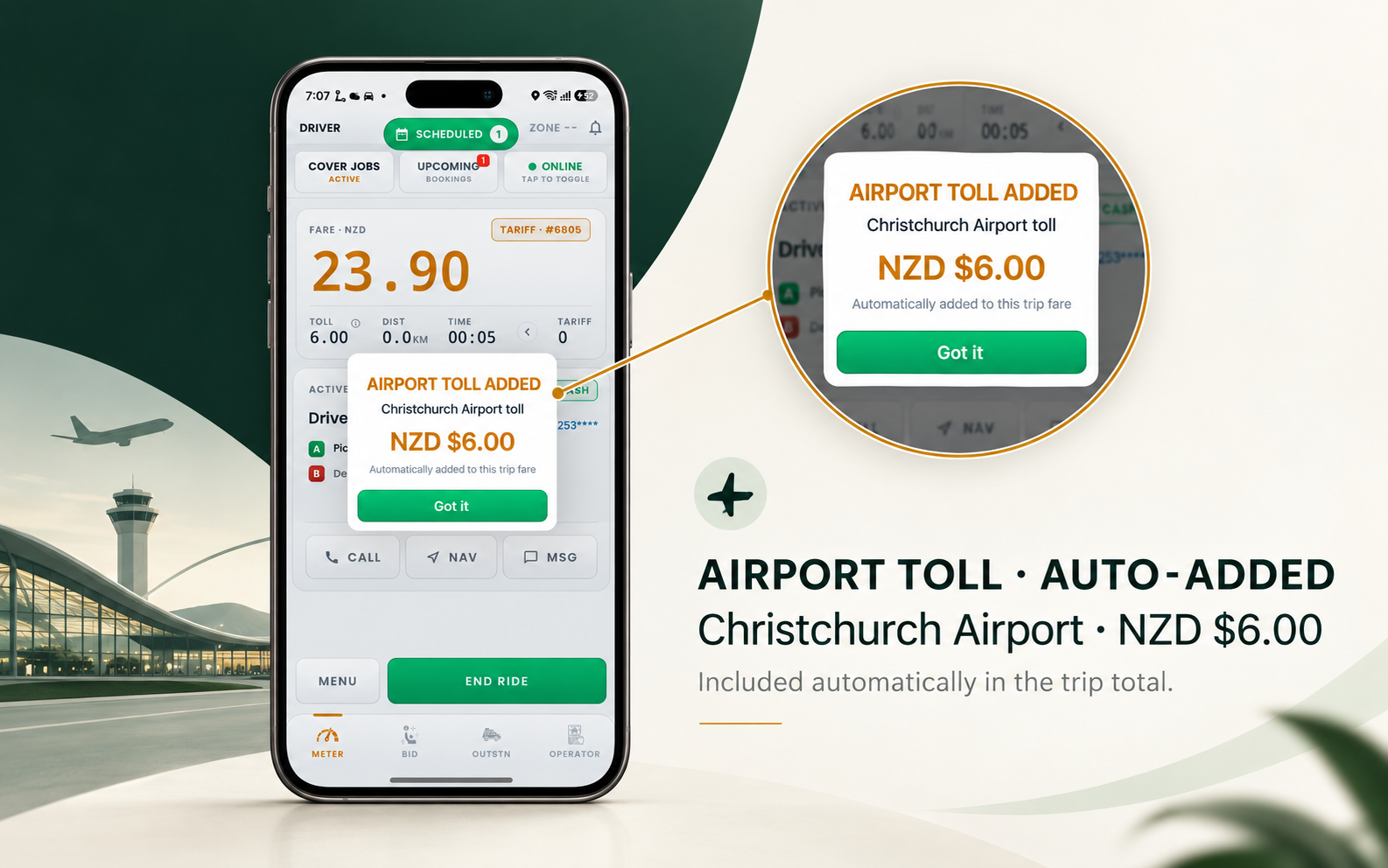
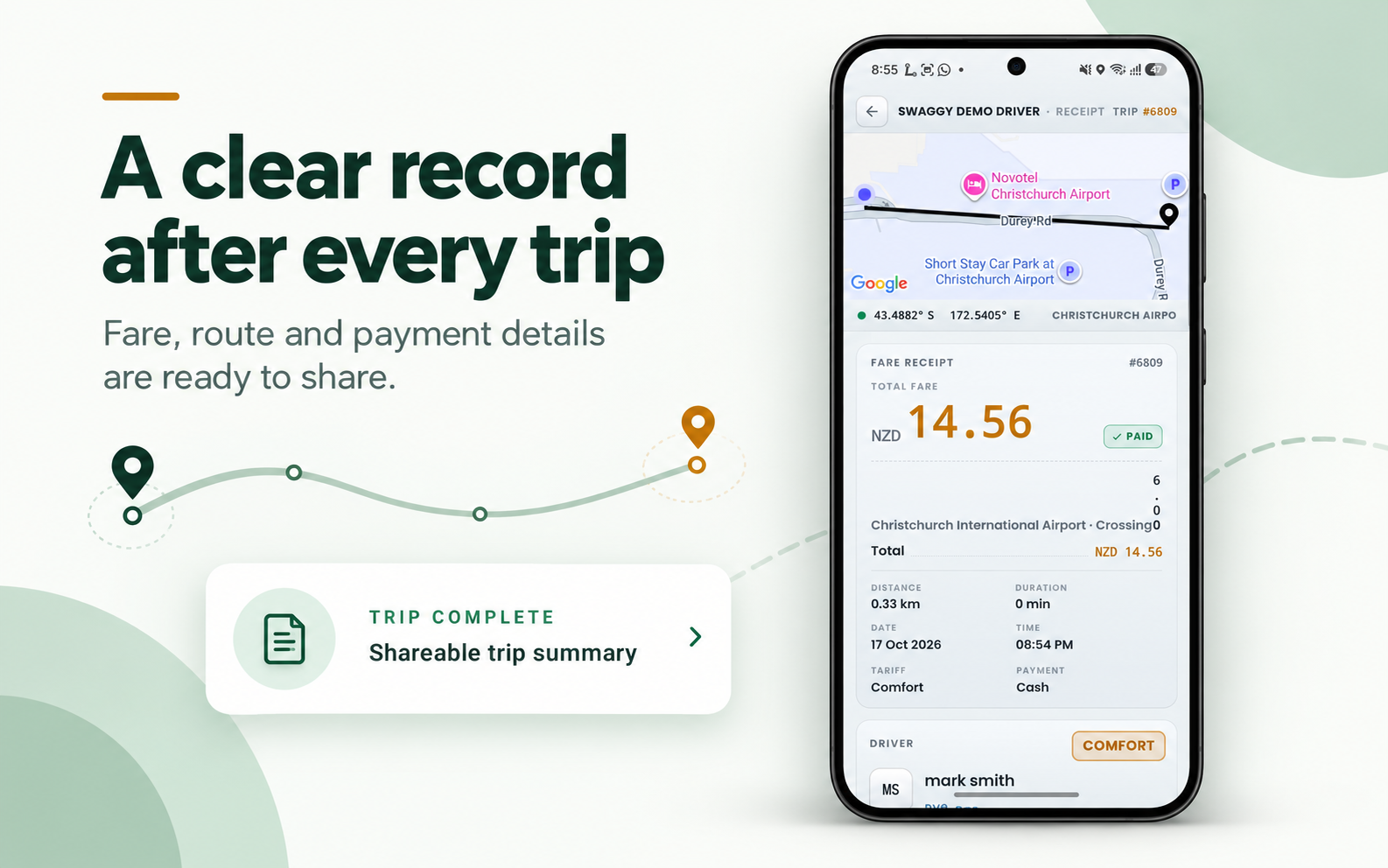
Keep fare context with the trip.
Fare calculation, toll treatment and trip records depend on the configured workflow and market.
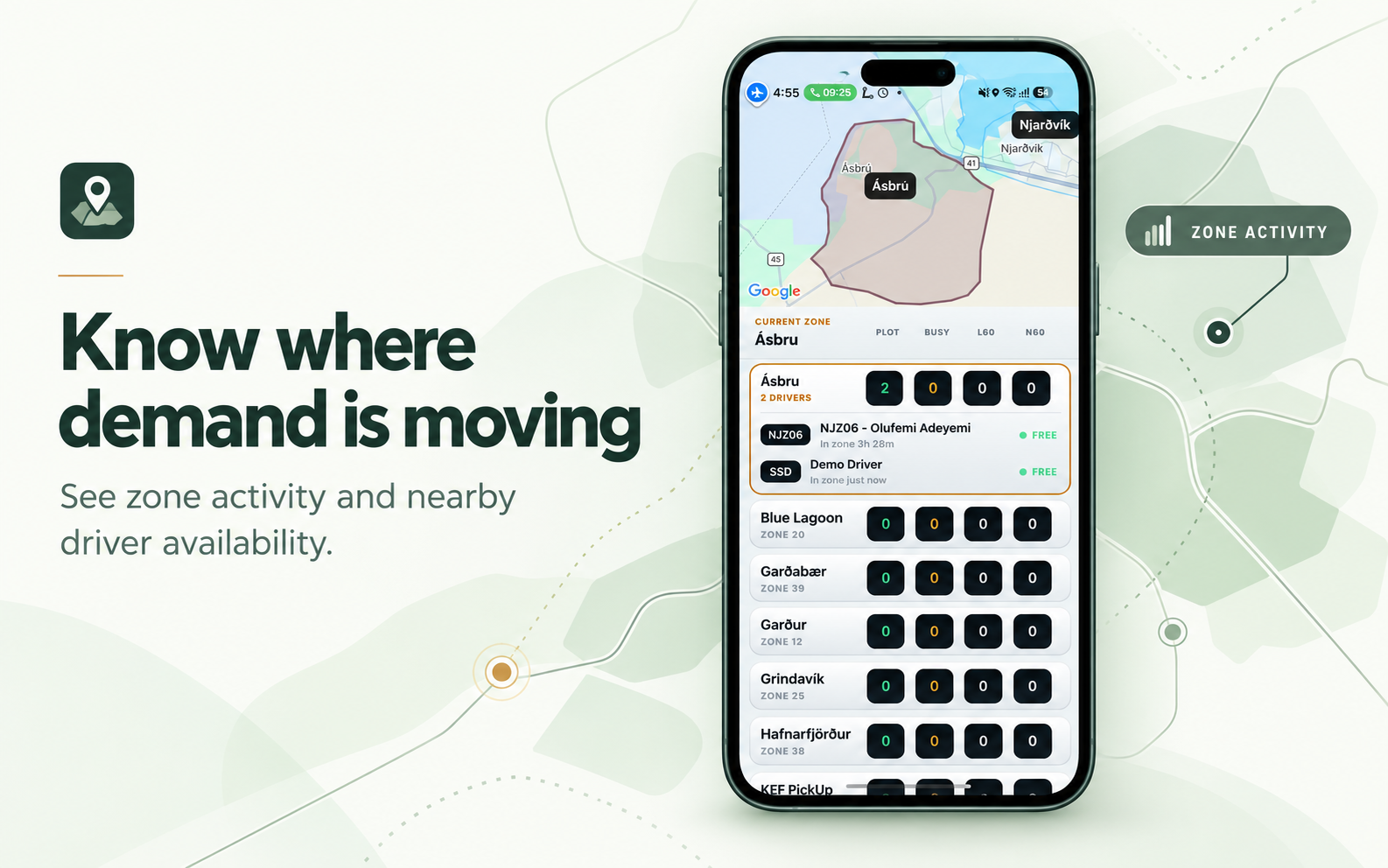
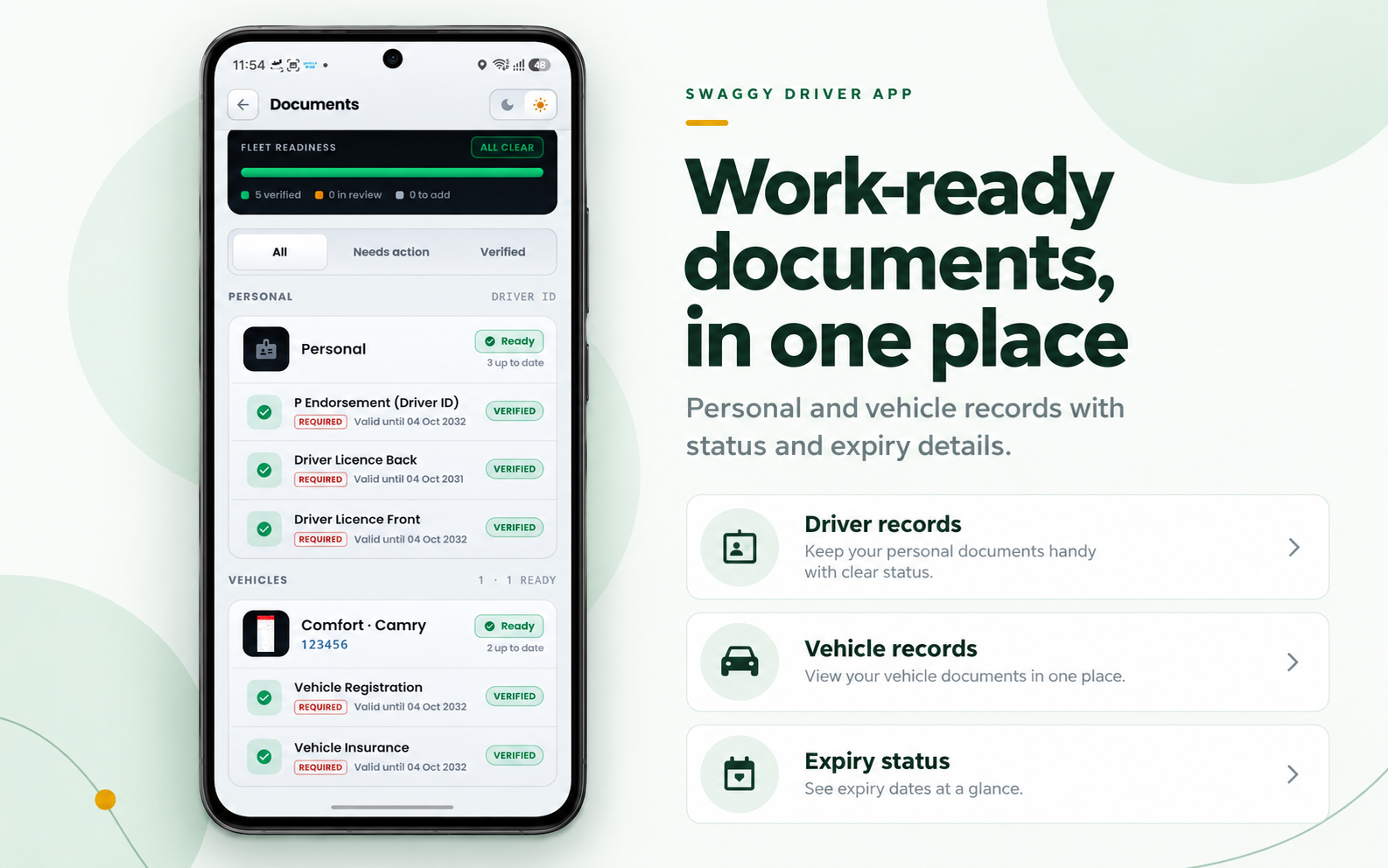
Connect service areas with driver readiness.
Zone visibility and document workflows can help operators apply their configured service and vehicle requirements.
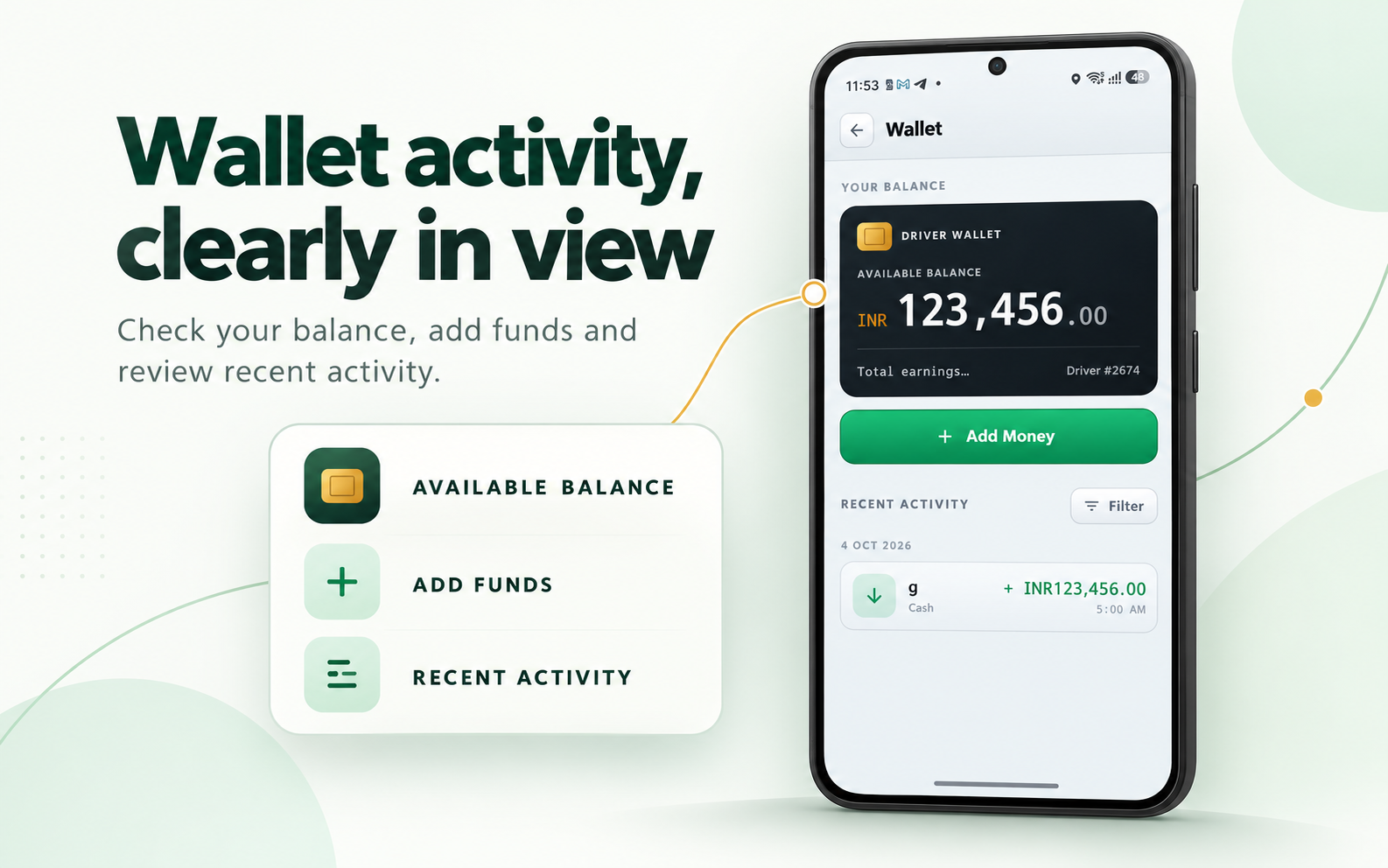
See what follows the completed ride.
Wallet, earnings and operator-network workflows should match the commercial model agreed with the client.
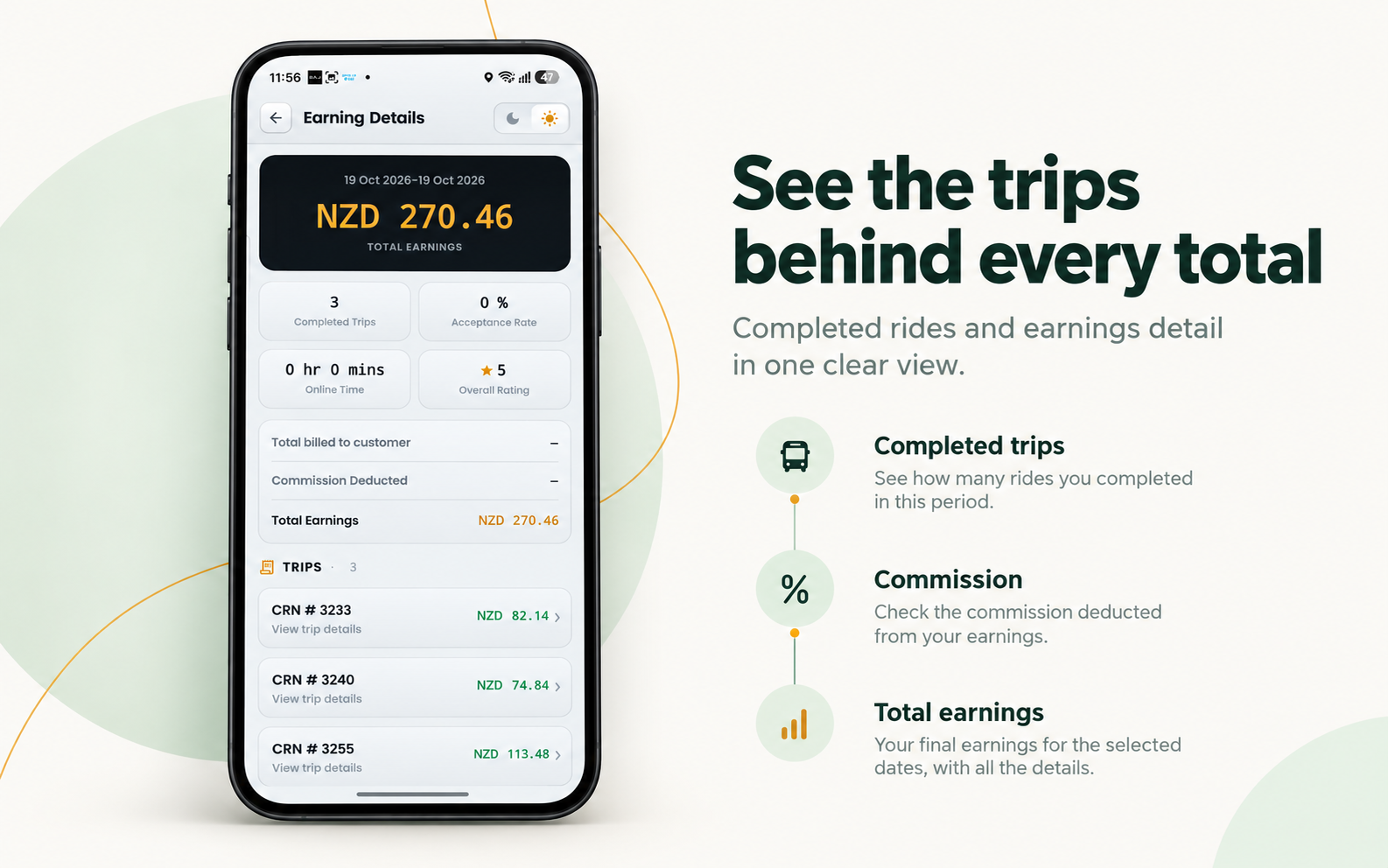
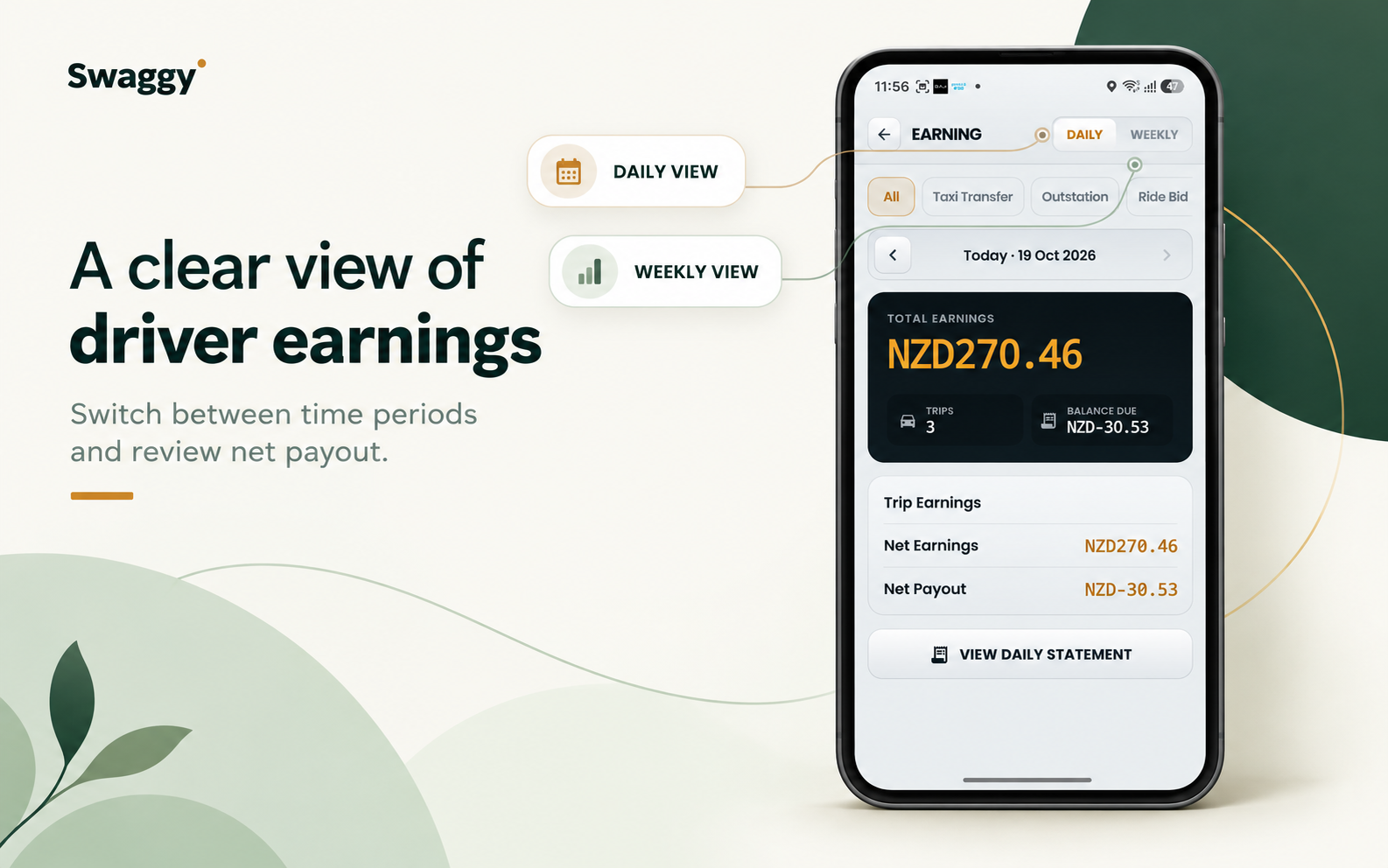
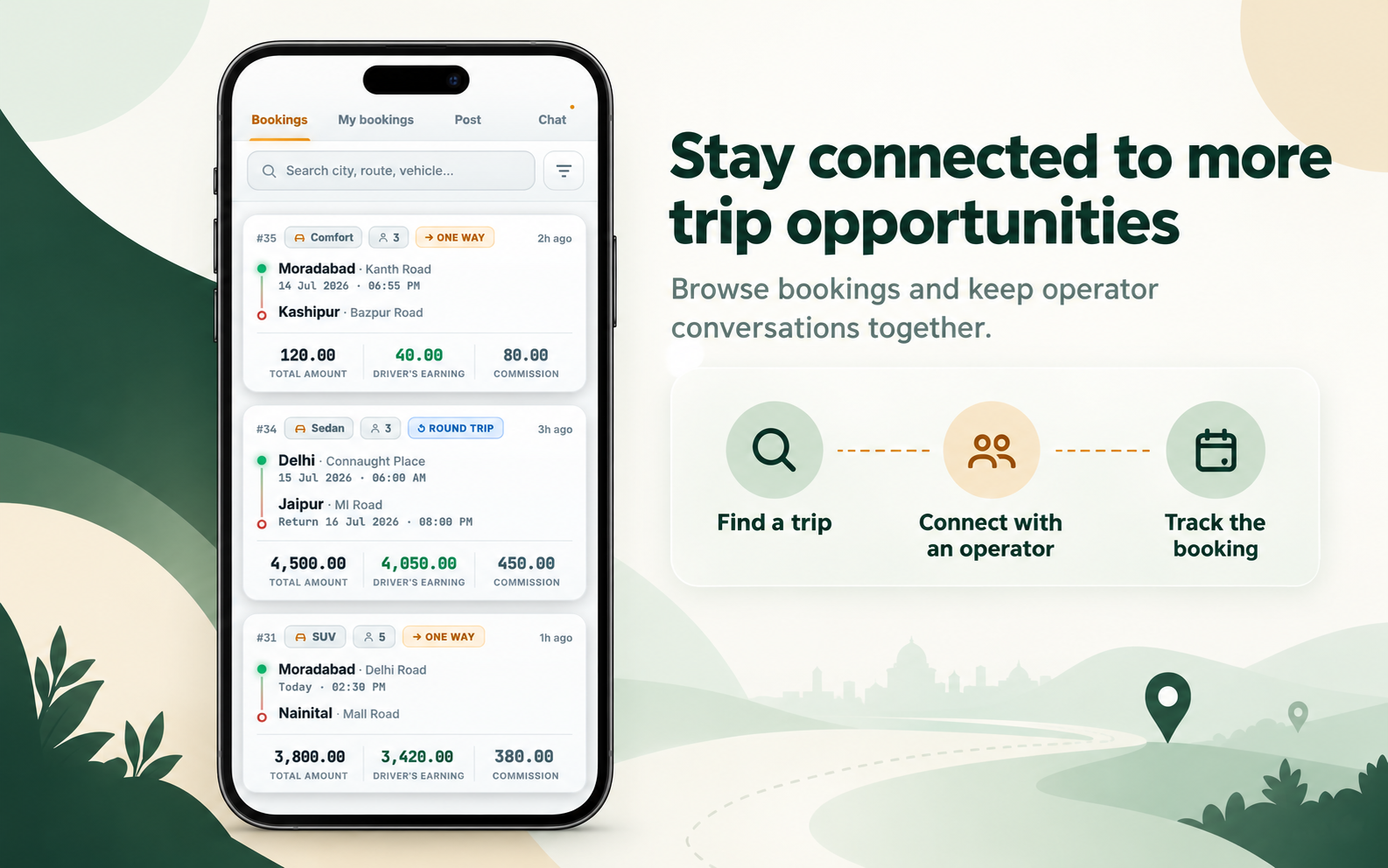
Supplied visuals include example names, addresses and amounts. Confirm approval and replace with sanitized production visuals before public launch if needed.
MORE THAN ONE KIND OF JOB
One driver app across configured ride models.
A driver app for a taxi company may need to support several booking types. The availability and rules for each type are defined for the project.
Taxi and private hire
Receive operator-dispatched work and follow the configured pickup, trip and payment workflow.
Ride bidding
Eligible drivers can review a passenger offer and accept or counter when bidding is enabled.
Scheduled and outstation
Show future bookings and longer-distance work with the relevant time, route and fare context.
Airport and corporate
Provide trip instructions and approved business-booking details within the driver workflow.
Shared rides and pooling
Use a configured multi-passenger or multi-stop workflow where the project includes it.
Tour and transfer work
Connect eligible transport jobs with tourism, transfer or supplier workflows when those modules are included.
USEFUL ON THE ROAD
Keep trip actions and fare tools connected.
The value is not just a map or fare display. It is the connection between a booking, the driver's trip status and the operating rules behind the work.
Navigation and trip progress
Move from accepted booking to pickup, arrival, trip start and completion. Mapping-provider options depend on the deployment and region.
GPS taxi meter
Where the meter module is enabled, fare calculation can connect with the driver workflow. Tariffs, minimums, waiting and surcharges must match the operator's approved rules.
Toll treatment
Configured toll rules or supported data integrations can help apply the relevant toll treatment to a trip. The method and amount vary by market.
Zones and service areas
Configured zones can inform dispatch eligibility, area-specific workflows or operational alerts where those controls are enabled.
Airport information
Show airport pickup instructions and operating notes. Flight information depends on the selected data provider and airport coverage.
Notifications and prompts
Push notifications and selected voice prompts can call attention to configured trip events without turning the driver app into a stream of marketing messages.
Vehicle and service selection
Approved vehicles and categories can determine which work becomes available, based on the operator's service and eligibility rules.
Third-party maps, flight data, payment services and other integrations are scoped against provider availability, API limits, fees and regional coverage.
DRIVER AND VEHICLE ELIGIBILITY
Work eligibility can follow the approved driver and vehicle.
The app can support onboarding that collects the records an operator needs for its market and business model. Where configured, missing, expired or unapproved records can affect app access, service eligibility or the work offered to a driver.
Document upload alone does not prove legal compliance. Verification rules, reminders and approval responsibilities should be confirmed for each deployment.
- Driver identity and driving-authority records
- Vehicle registration, inspection and insurance details
- Document expiry dates and approval status
- Vehicle category and service eligibility
This is explanatory page artwork, not an additional product screenshot.
PAYMENTS AND TRIP RECORDS
Give drivers a clearer view of the transaction.
A driver app for taxi dispatch can support different payment flows. The selected setup may combine direct driver payments, centrally processed card payments, wallet deductions and trip records.
Payment options
Cash, a driver-managed terminal or in-app card payments can be scoped to the client's business and payment-provider setup.
Wallet and platform fees
Where a prepaid-wallet model is enabled, the app can show balance and activity, and apply configured fees or booking charges.
Earnings and trip history
Show trip and payment information that matches the settlement model. Do not position the driver app as tax-accounting software unless that function exists.
APPROVED BOOKING SHARING
Let the work reach beyond one dispatch queue.
The Trip Operator Network can let approved participants publish, share or accept suitable bookings when the original operator cannot fulfil a trip. Availability, visibility, eligibility and fees depend on the configured network rules.
- Keep shared bookings inside the platform workflow
- Apply vehicle and participant eligibility rules
- Retain a booking record when suitable work is redistributed
Where the wider project includes tours, activities or transfer services, eligible ground-transport work can connect with the same mobility ecosystem.
CONFIGURED FOR THE DEPLOYMENT
Driver workflows should fit the local operation.
A global driver app cannot assume every market uses the same documents, fare rules, payment methods or privacy settings. Define these requirements with the client and configure the technology accordingly.
Records and eligibility
Set the document types, approval steps, expiry fields and vehicle-category requirements the operator needs.
Commercial model
Scope metered or quoted fares, bidding, waiting, tolls, card providers, wallet rules and settlement records.
Operational boundaries
Agree what location data is used, when it is collected, and how it is disclosed and retained.
Deployment scope
Confirm required operating systems, branding, app-store accounts and release responsibilities for the project.
WHO IT SUPPORTS
For businesses that need more from the driver app.
A white-label taxi driver app can serve a specific role in a larger dispatch and mobility system. Taxi Driver App focuses on that driver-side operating experience rather than repeating the full platform, white-label ownership or fleet-management pitch.
Taxi companies replacing phone, radio or legacy driver workflows
Private-hire and chauffeur operators connecting dispatch with driver status
Ride-hailing startups building a branded driver network
Multi-city fleets with different vehicle and service categories
Marketplaces using bidding or approved operator-to-operator booking distribution
Airport-transfer and tourism businesses with transport-driver workflows
FROM WORKFLOW TO DEPLOYMENT
Start with how your drivers actually work.
A driver-app project should begin with the operation, not a generic clone checklist. Map the real booking and payment journeys before deciding which modules are standard, configured or custom.
Map the operation
Document booking types, vehicle categories, driver onboarding, payment methods, dispatch and service-area rules.
Agree the scope
Choose the driver-side modules, integrations, country requirements and app-store responsibilities.
Run real scenarios
Check booking offers, trip stages, fares, payments, driver eligibility and operational exceptions.
Plan the transition
For an existing fleet, plan account and vehicle records, app distribution, training and cut-over from the previous system.
QUESTIONS OPERATORS ASK
Taxi driver app questions.
Discuss the driver workflow, project scope and market requirements with Swaggy Info Labs.
Ask about your projectWhat is a taxi driver app?
It is the mobile application drivers use to receive work, manage availability, navigate to passengers, progress trips and view relevant fare or payment information connected to the operator's dispatch platform.
Can the driver app use our brand?
Branding can be configured as part of an agreed white-label or custom deployment, including app identity, logo, colours and store presentation.
Does the taxi driver app support ride bidding?
Where the ride-bidding module is enabled, eligible drivers can review a passenger's fare offer and accept or submit a counter-offer under the platform rules.
Can drivers receive scheduled and outstation bookings?
Multiple booking models, including instant, scheduled and longer-distance work, can be supported when those services are included and configured.
What is the Trip Operator Network?
It is a B2B booking-distribution workflow that can let approved participants publish, share or accept suitable work when the original participant cannot fulfil a booking.
Can the app use a GPS taxi meter?
Where the meter module is enabled, GPS-based fare calculation can connect with the driver workflow. Fare rules still need to match the operator's business and local requirements.
Can drivers use cash or their own EFTPOS terminal?
The platform can be scoped for direct driver payments and centrally processed in-app payments. Exact options depend on the client's commercial model and payment-provider setup.
Can wallet balance affect booking eligibility?
A prepaid wallet can be connected to selected booking or marketplace rules where that model is configured, with applicable charges handled according to the agreed business rules.
Can the system track document expiry dates?
Selected driver and vehicle records can include expiry dates and approval states. The operator defines any reminders, review steps and eligibility rules.
Does Swaggy use face recognition to verify drivers?
Face recognition is not presented here as a standard capability. The brief describes account access, document approval, booking records and operator review; biometric verification would need separate confirmation and scope.
Does the app track drivers when they are logged out?
Location behaviour should follow the client's operational and privacy requirements. The collection, disclosure and retention rules must be defined for each deployment.
Can the driver app show airport or flight information?
Airport instructions can be configured for the driver ecosystem. Flight information depends on the selected data provider and airport coverage.
Can the driver app connect with tours or payment providers?
Ground-transport workflows and third-party services can be scoped where the project includes the relevant modules and a suitable API is available. Provider limits, fees and regional support apply.
Is the driver app automatically compliant in every country?
No. Swaggy can configure the technology around documented local requirements, but the operator remains responsible for appropriate local advice, licences and approvals.
SEE THE DRIVER WORKFLOW LIVE
Build a driver app around your operation.
Bring your booking types, payment model, driver requirements and operating rules. Swaggy Info Labs can demonstrate the available mobility technology and define which modules should be standard, configured or custom for your deployment.
Swaggy Info Labs builds configurable mobility technology. Features, integrations, branding and deployment scope depend on the agreed project.