FLEET OPERATIONS · DRIVER READINESS · DISPATCH CONTROL
Taxi fleet management software built for daily operations
Manage drivers, vehicles, bookings, service areas, operational eligibility and fleet activity from one configurable taxi technology platform. Connect the records behind your fleet with the dispatch and driver workflows that move passengers.
- Drivers and vehicles
- Dispatch eligibility
- Zones and records
ONE OPERATING LAYER
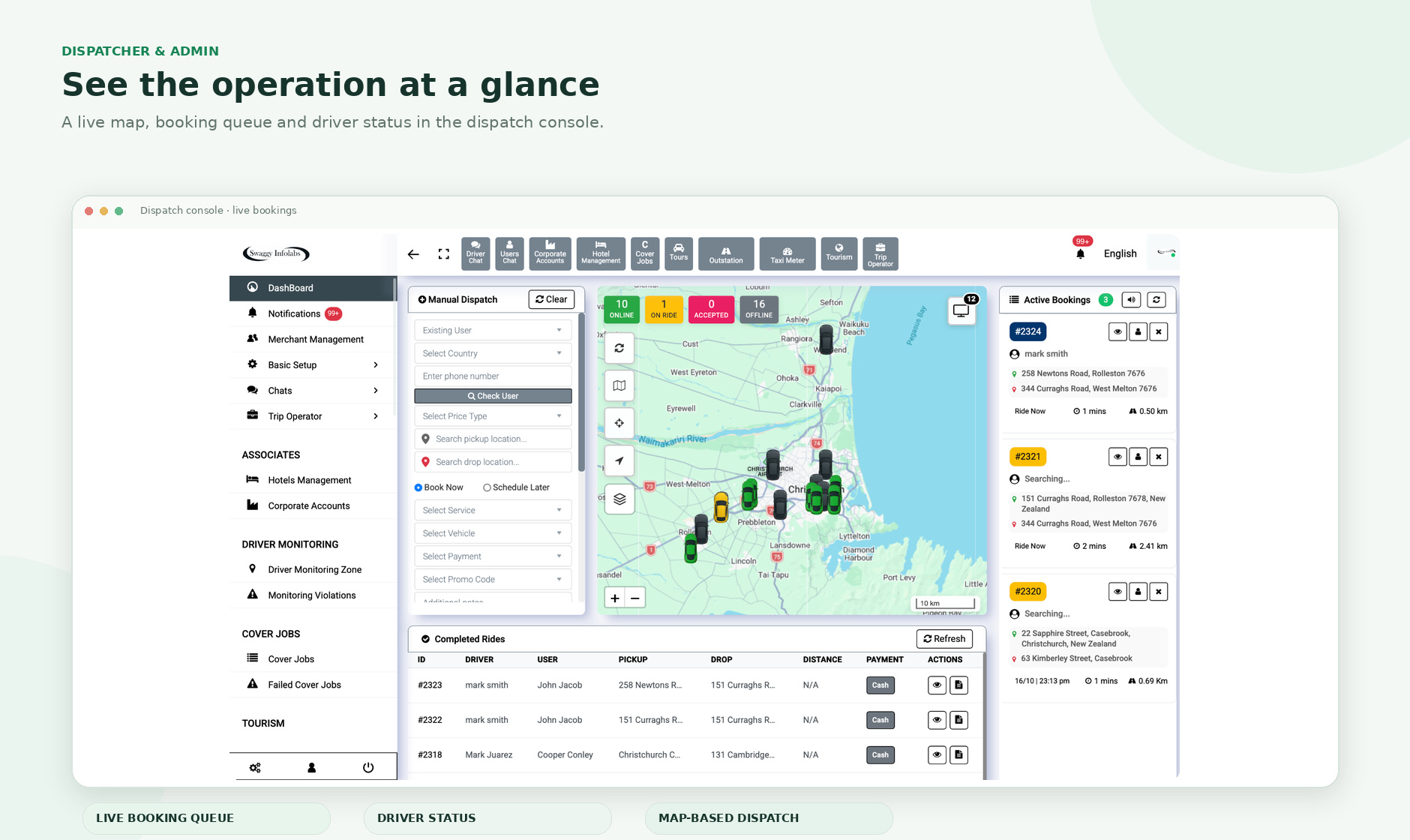
Fleet management should be connected to dispatch
A taxi fleet is more than a list of vehicles. Every working vehicle connects to a driver, a service category, an operating area, a set of documents, booking eligibility and live trip activity.
When those records sit in separate systems, dispatchers spend time checking information manually and managers lose a clear view of what is ready for work. Swaggy Info Labs brings fleet administration closer to the live booking operation.
The goal is practical: help the operator see who is available, what they are approved to drive, which work they can receive and what is happening across the fleet now.
A SINGLE VIEW, WITH CONTEXT
See drivers, vehicles and operational controls
Fleet managers need more than static records. The useful view connects identity, vehicle capability, current status, service eligibility and booking context.
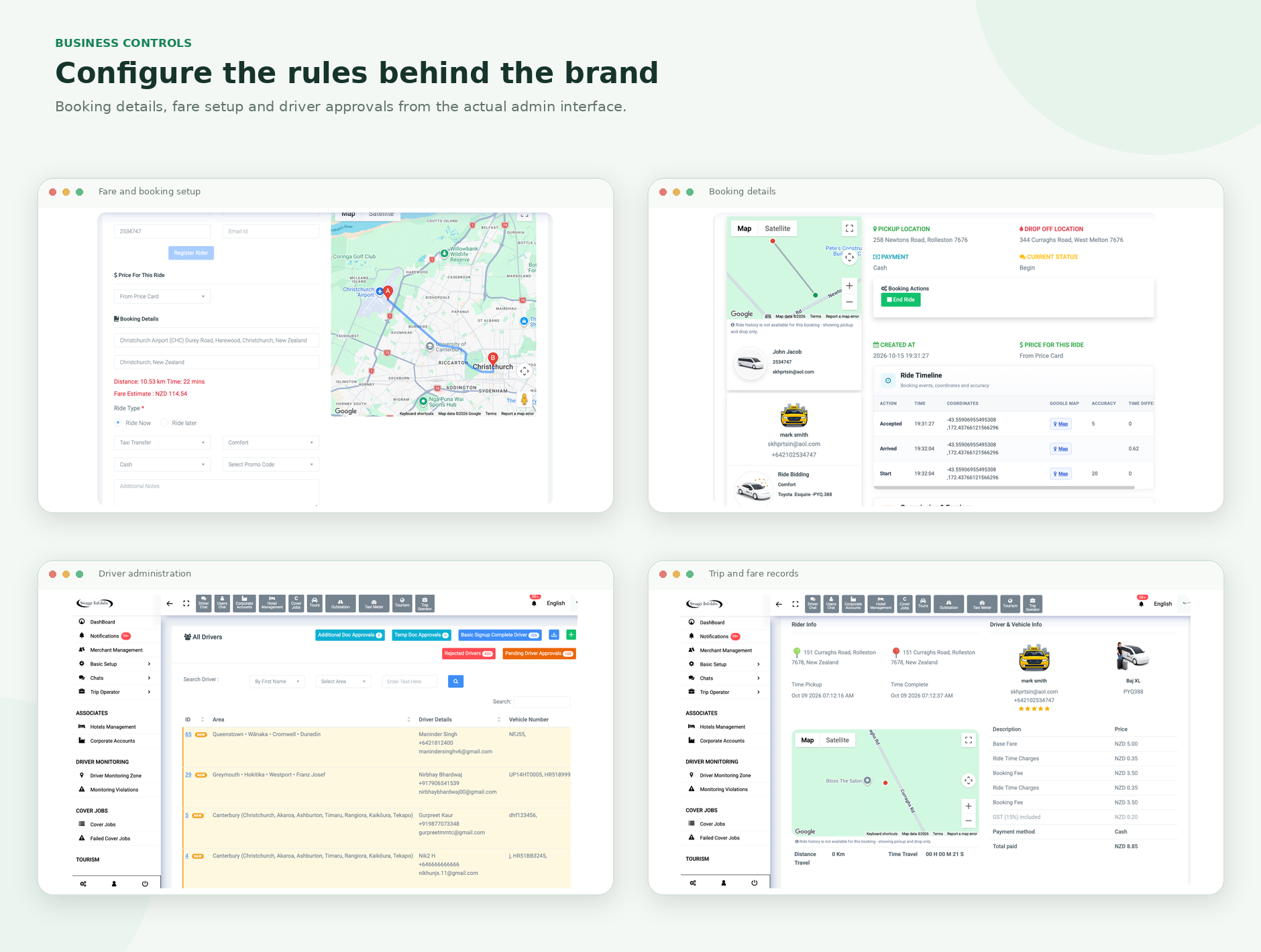
Driver records
Profile, account state, documents, approved services and booking activity.
Vehicle records
Registration information, capacity, category, assigned driver and required documents.
Booking context
Assignment state, trip details, service area and dispatch workflow.
Fleet activity
Online state, live location while working, active jobs and trip progress.
LIVE FLEET VISIBILITY
Understand activity without losing the operating context
A live map is useful when it helps the team answer operational questions: which drivers are working, which vehicles are active, whether a driver is already on a job and whether the vehicle fits the request.
- View working drivers and relevant live location information.
- Connect availability with booking and trip state.
- Use service-area and zone context to understand coverage.
- Support dispatch decisions with vehicle and service eligibility as well as proximity.
- Align location collection with the operator’s configured privacy and operational policies.
DRIVER MANAGEMENT
Know who is approved to work
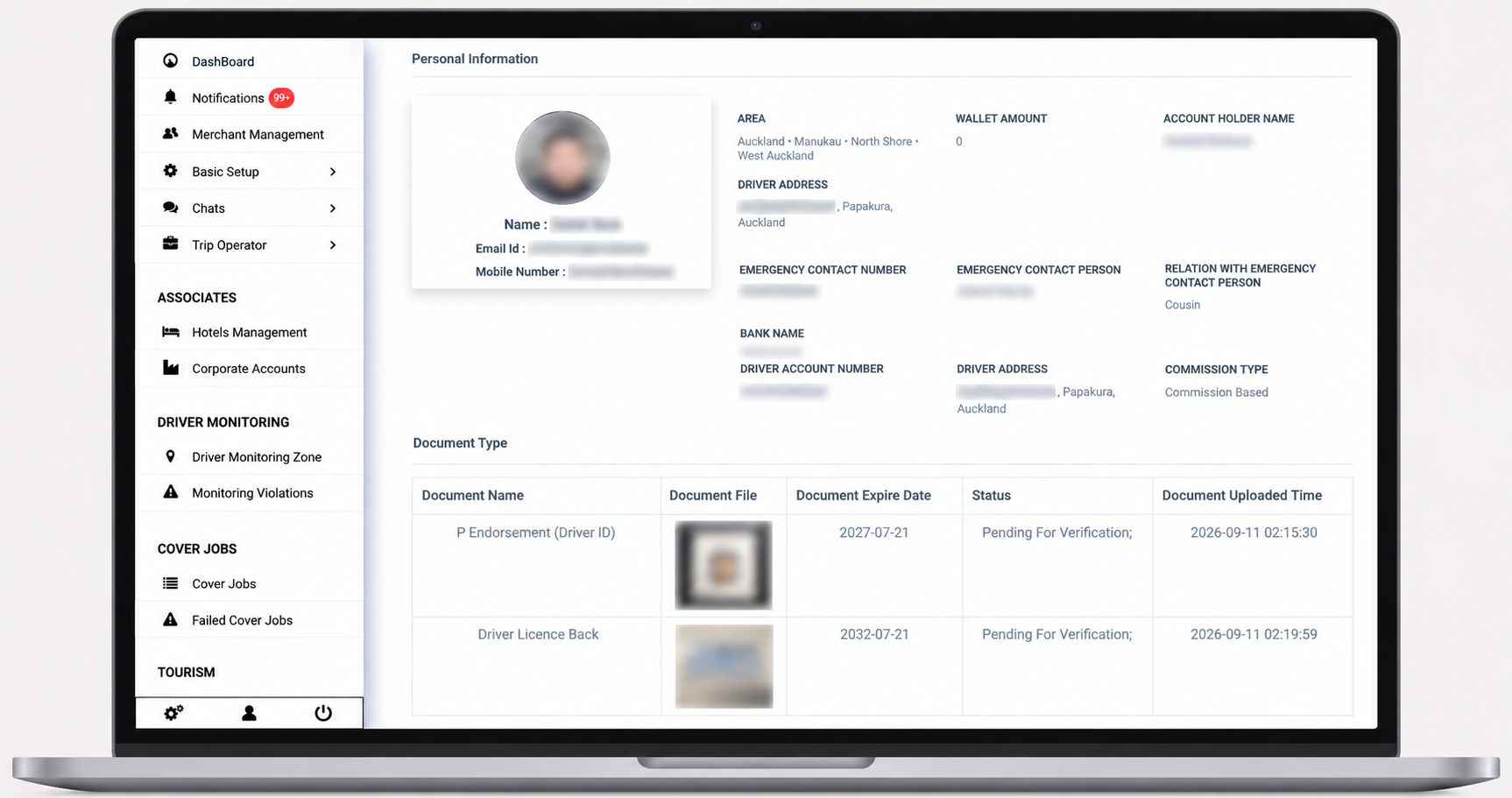
Review driver information, selected records and approval state before work is offered. The exact document types and reminders depend on the operator’s configuration and local requirements.
Driver profile and working status
- Driver profile and account information.
- Licence and transport-authority records where required.
- Issue and expiry dates where applicable.
- Approval, suspension or inactive status controls.
- Eligible services, vehicle association and booking activity.
- Configured reminders and review of reported account-sharing or driver-mismatch concerns.
Where configured, missing or expired records can affect work eligibility. Confirm the exact disable, reminder and reinstatement behaviour in the production build.
VEHICLE MANAGEMENT
Match the right vehicle to the right work
Mixed fleets may include standard cars, larger vehicles, premium categories, accessible vehicles, vans or specialist classes. Configured service categories help dispatch reflect those differences instead of treating every vehicle as interchangeable.
- Registration and identifying information.
- Configured seating capacity and service category.
- Accessibility or specialist capability where applicable.
- Approved driver association and document state.
- Commercial insurance, inspection/fitness and registration records where required.
- Availability for selected ride types or booking channels.
- Review and approval before platform work where configured.
A booking can then be offered according to service rules, not only the nearest vehicle on the map.
DOCUMENTS · REVIEW · ELIGIBILITY
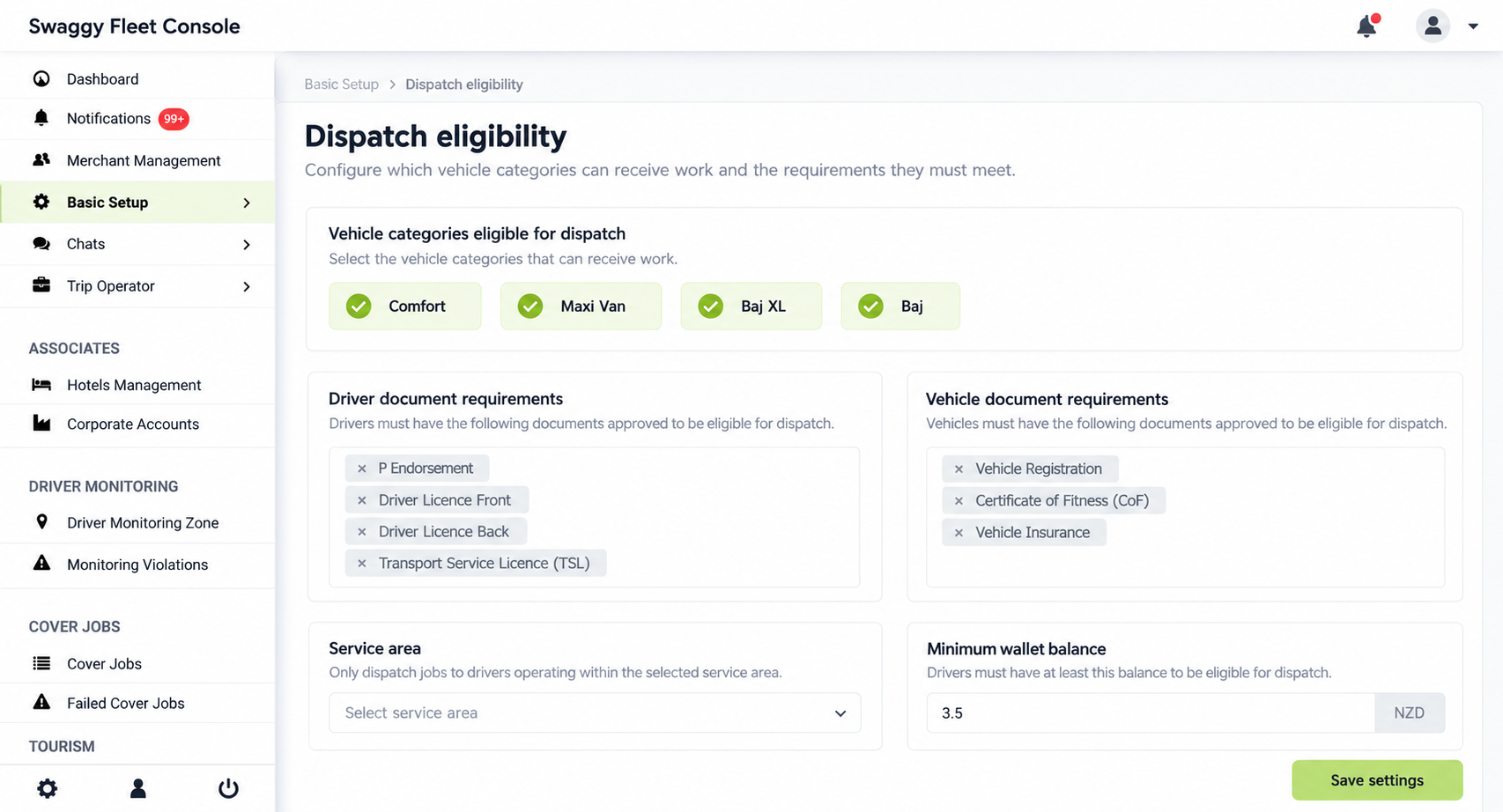
Turn expiry dates into visible operating rules
Different driver, vehicle, insurance, registration and inspection records can expire at different times. Selected expiry dates and review states can be kept with the fleet records so teams can see what needs attention.
Record
Set the document types the operator needs to collect.
Review
Check evidence and maintain the appropriate approval state.
Apply
Use configured eligibility rules when matching work to drivers and vehicles.
DISPATCH READINESS
Availability is more than “online”
Dispatch readiness can depend on the vehicle class, passenger count, accessibility requirement, service area, ride type, document status, driver approval, wallet or account rules and other operator settings.
Use configured capacity and service categories to match a booking.
Apply selected account and document conditions where configured.
Use location, zones and service coverage as part of the decision.
Keep immediate, scheduled, airport and other workflows distinct where required.
Ready for the request
Configured eligibility + service + booking state
MIXED FLEETS
Service categories that fit your fleet model
Operators can configure categories around passenger capacity, comfort, vehicle capability or ride type. Naming and eligibility follow the transport business rather than a fixed universal list.
ZONES & GEOFENCING
Use service areas as operational controls
Zones can define coverage, airport areas, contracted sites, restricted operating areas or business-specific rules. They can support relevant location monitoring and configured pricing, eligibility or dispatch logic.
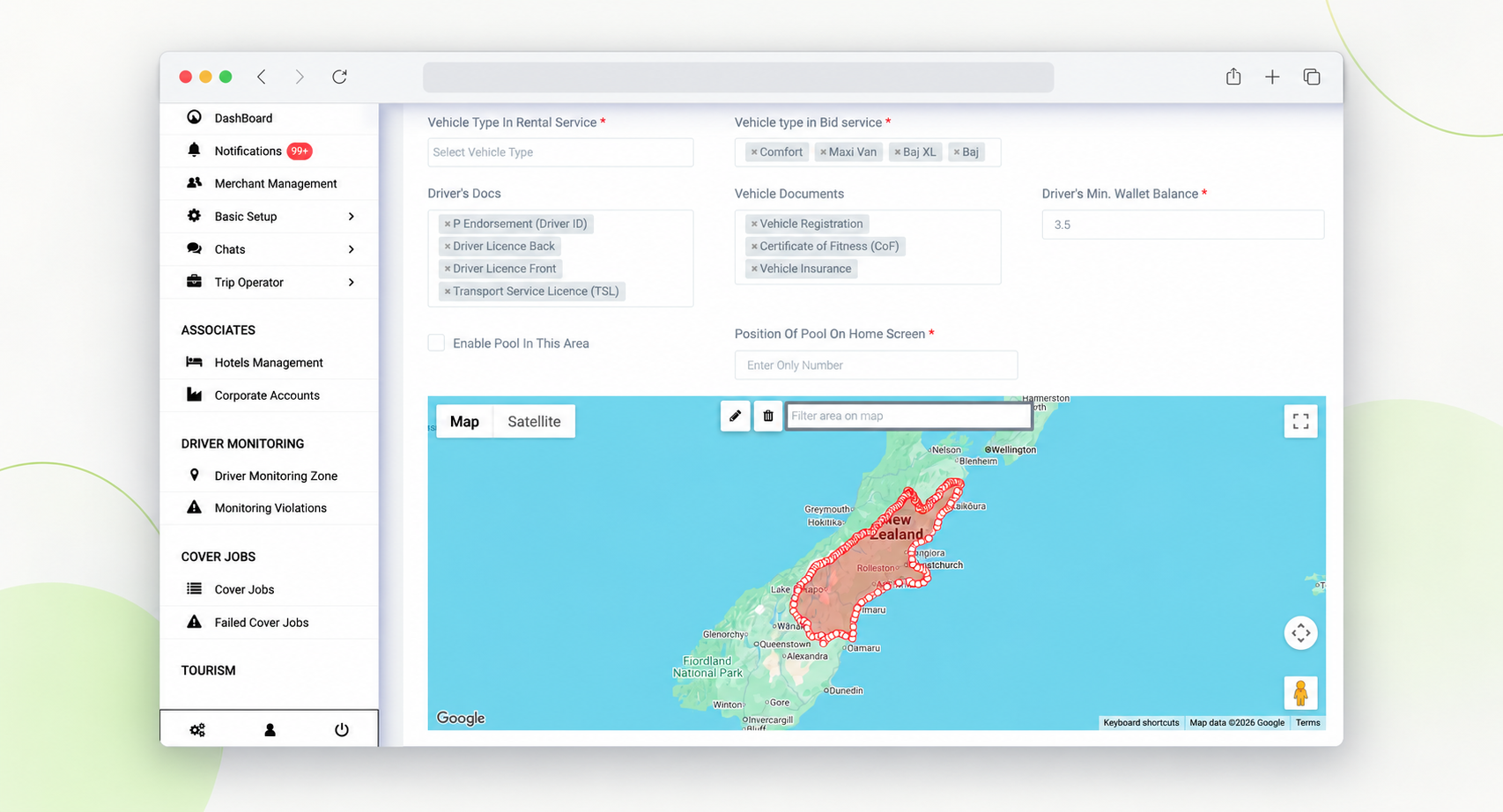
Set service areas and operational boundaries.
Apply area rules for services, pricing or dispatch where supported.
Review relevant driver presence while the driver is logged in and working.
Set different operating rules for cities or regions within the deployment.
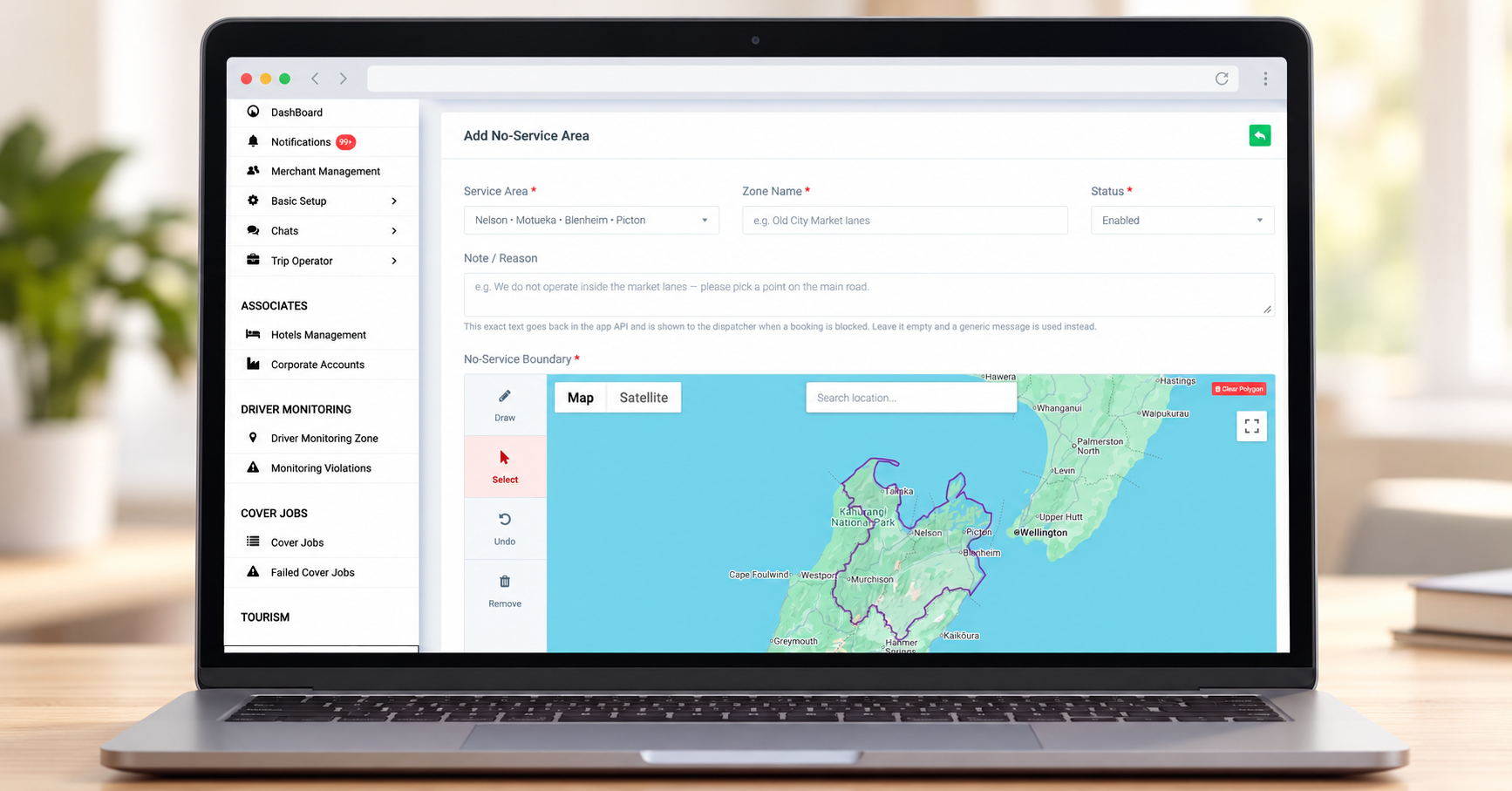
Airport and contracted-site operations may need distinct pickup instructions, access rules, waiting expectations or fees. Swaggy can support configured airport information in the workflow; flight data depends on a suitable supported integration.
TRIP OPERATOR NETWORK
Share suitable work across an approved network
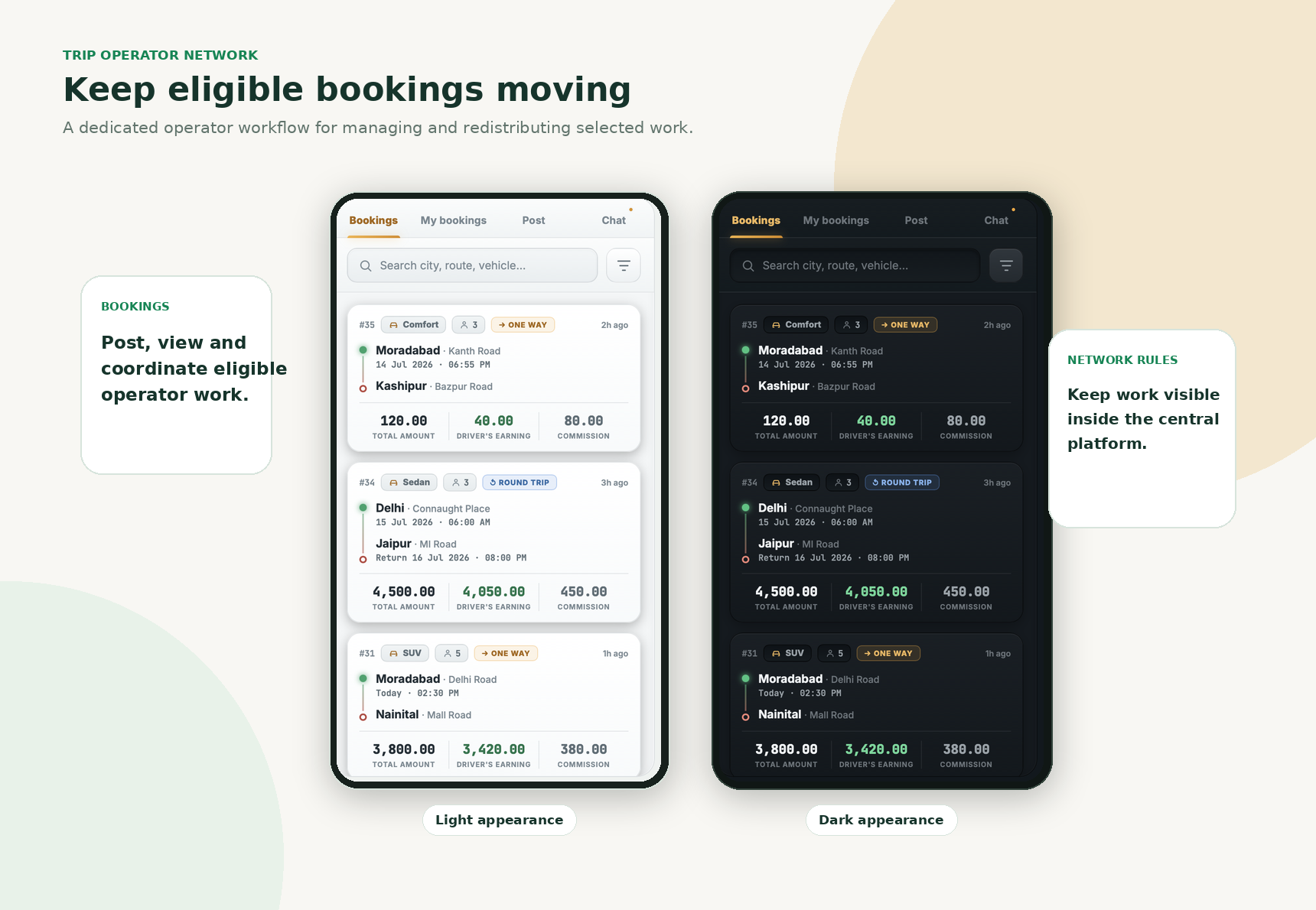
When the first driver or operator cannot fulfil a booking, a configured network workflow can give approved participants a way to publish, share or accept suitable work within defined rules.
- Redistribute eligible work when the original operator cannot fulfil it.
- Expose bookings to approved participants under configured network rules.
- Keep booking information and platform charges connected where enabled.
- Use wallet or account conditions for acceptance where configured.
This B2B workflow can complement an operator’s own passenger-to-driver dispatch operation.
MULTIPLE RIDE MODELS
More than one service. One connected operation.
Different transport models can use distinct eligibility, fare and dispatch rules within the broader platform, depending on the scope selected for the deployment.
Standard taxi
Immediate or scheduled jobs with configured categories and dispatch rules.
Ride-hailing
App-based requests, driver matching and live trip status.
Ride bidding
Eligible instant requests may use a passenger fare offer and driver response flow.
Shared rides
Pooling workflows can be scoped where the operating model and local rules support them.
Outstation & intercity
Longer journeys can use separate service, fare and scheduling rules.
Airport & account work
Airport transfer, corporate and controlled account workflows can sit alongside consumer demand.
GPS TAXI METER & FARE TOOLS
Keep metered work close to the driver workflow
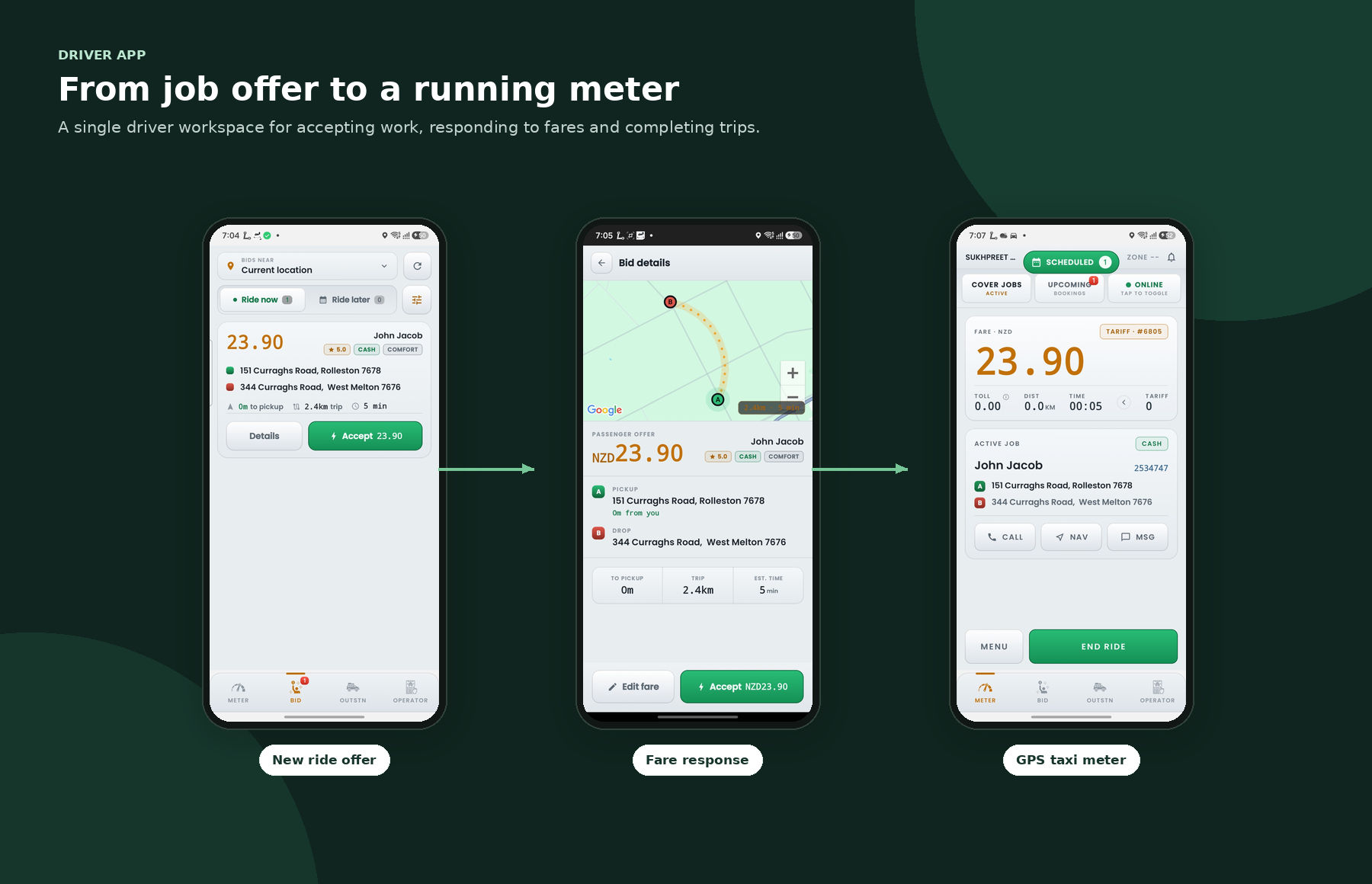
For fleets that operate metered journeys, GPS taxi-meter technology can be integrated with the driver workflow for selected service models. This can keep booking status and fare tools closer together instead of moving between unrelated applications.
- GPS-based time and distance fare calculation.
- Operator-configured fare parameters and tariffs.
- Fare workflow in the driver operating environment.
- Automatic toll or trip-charge handling where implemented.
- Fare records connected to the booking where enabled.
Offline fare continuity, device requirements and synchronisation behaviour depend on the module and deployment configuration.
FLEET ECONOMICS
Connect fares, fees and payment workflows
Commissions, platform fees, wallet balances, driver-managed payments and app card transactions can be configured around the selected operating model and supported payment providers.
Fare rules
Define configured fare components and service pricing for the selected ride model.
Wallet & platform fees
Apply driver balances, commissions or eligible deductions where the deployment enables them.
Payment options
Connect supported gateways and agreed cash or driver-managed payment methods.
Transaction records
Keep fare, fee and payment records tied to the configured booking workflow.
Fee labels, tax treatment, card surcharges and settlement rules must be reviewed for the client’s jurisdiction and payment-provider terms before configuration.
COUNTRY-READY CONFIGURATION
Configure for local needs. Keep the rules clear.
Transport licensing, taxes, invoicing, payment processing and marketplace obligations vary between countries and may also differ by state, province, council or operating model. Swaggy can configure technology around the client’s documented requirements; the client remains responsible for confirming the applicable legal treatment.
MULTI-CITY · MULTI-ZONE · MULTI-FLEET
Expand operating areas with local differences intact
A growing operator may need to separate service areas, categories, pricing and rules while keeping a broader administration environment. The exact structure depends on whether the business runs one fleet, regional fleets, a franchise or a marketplace.
- Configure service-area and city coverage.
- Set area-specific categories or ride products where supported.
- Apply different fare or operating rules by market where configured.
- Keep drivers and vehicles within the right operating structure.
CONFIGURABLE OPERATING STRUCTURE
Keep local rules visible as the operation grows.
One broader administration environment can support separate configured operating areas.
REPORTS & OPERATIONAL RECORDS
Use records to understand what happened
Fleet managers need evidence as well as live status. Available records depend on the enabled modules and should be demonstrated from the current product build.
Bookings & trips
Trip history, assignment state and relevant journey details.
Drivers & vehicles
Approval, status, service association and selected document records.
Accounts & activity
Login and account events available in the backend.
Fare & payment
Fare, fee, wallet or payment records where those workflows are enabled.
BOOKING CHANNELS
Bring booking sources into the same operation
Connected booking channels can reduce manual re-entry and keep job details in the dispatch workflow. The channels available depend on project scope.
MOBILITY & TRAVEL
Connect fleet operations with tourism and transfers
Swaggy’s wider technology can connect ground transport with tours, activities, transfers and supplier or OTA workflows where the business requires it. For airport, hotel and destination operators, this can support a broader travel ecosystem alongside the operational transport system.
Confirm the required marketplace modules, supplier workflows and integrations during project planning.
Discuss tourism and ground transport requirements →INTEGRATIONS & APIS
Plan the connections your fleet actually needs
Integration scope should name the provider, data, authentication method, event flow and responsibility for third-party fees before implementation.
WHO IT IS FOR
Built around the people running the fleet
Taxi companies
Connect dispatch, driver records, vehicles and bookings.
Private-hire operators
Manage advance rides, vehicle classes, airports and account work.
Ride-hailing businesses
Operate an app-based driver network with service and fleet rules.
Multi-vehicle owners
Coordinate approved drivers and vehicles within the operating structure.
Airport & transfer operators
Set up service areas, scheduled jobs and suitable vehicle classes.
Mobility marketplaces
Coordinate owned fleet supply and approved external providers.
Tourism transport businesses
Connect transfers and ground transport with tour or activity distribution.
Regional operators
Run several configured service areas and local operating rules.
WHY CONNECT THE FLEET TO THE PRODUCT?
More than a map of vehicles. A view of the business.
The fleet layer becomes more useful when it connects to the commercial booking products the operator actually runs.
Fleet records connected to dispatch and booking workflows.
Driver and vehicle approval controls that can affect work eligibility.
Taxi, ride-hailing, scheduled and specialist service workflows within a broader platform.
Trip Operator Network for approved B2B job distribution.
Zones, GPS fare tools, configured payment workflows and integration options.
A CLEAR IMPLEMENTATION SEQUENCE
Start with the fleet. Then map the rules.
Confirm the operating model before selecting modules or integrations. The delivery plan depends on the scope, current data and local requirements.
Fleet discovery
Document fleet size, driver model, vehicle classes, service areas, channels and current dispatch process.
Rules & eligibility
Define records, approvals, categories, zones, booking models and account rules.
Select modules
Confirm apps, dispatch, kiosk, meter, network and other required services.
Integration & branding
Agree provider connections and configure the selected brand and workflows.
Data & migration
Assess exports, data quality, integrations and records to retain or archive.
Test the operation
Check eligibility, bookings, zones, fares, payments, notifications and exceptions.
Go live & iterate
Launch the agreed scope and prioritise improvements from fleet use.
PRACTICAL ANSWERS FOR FLEET OPERATORS
Taxi fleet management software FAQs
Confirm module availability, integrations and market-specific rules during the product walkthrough and proposal.
What is taxi fleet management software?
Taxi fleet management software helps operators manage the drivers, vehicles, bookings and rules behind the fleet. Swaggy’s platform can connect fleet records with dispatch, service categories, live driver activity, selected document status, zones, payments and other configured workflows.
How is fleet management different from taxi dispatch software?
Dispatch focuses on receiving, assigning and managing bookings. Fleet management also covers the people, vehicles, approvals, service eligibility, documents, operating areas and records that determine whether the fleet is ready to fulfil those bookings. Swaggy can connect both layers.
Can I track drivers and vehicles live?
The platform can support live driver location and trip visibility while a driver is logged in and working, subject to deployment settings, permissions and privacy requirements. Tracking behaviour should be configured for the operator’s business and jurisdiction.
Can the system track driver and vehicle document expiry dates?
Selected driver and vehicle documents can include recorded expiry dates and may be part of reminder, review and eligibility workflows. The operator decides which records are required and remains responsible for validating them.
Can an expired document stop a driver from receiving jobs?
The platform can be configured so selected missing, expired or unapproved requirements affect work eligibility. Agree and test the exact automation and reinstatement process for the deployment.
Can I manage different vehicle categories?
Service and vehicle categories can be configured around the operator’s fleet, such as standard vehicles, larger vehicles, premium services, accessible vehicles, vans or other specialist categories.
Does the platform support multiple cities or service areas?
It can support multiple configured service areas, zones and operating rules. The exact structure depends on whether the business operates one fleet, several regional fleets, franchises or a marketplace.
Can the software manage airport taxi work?
Airport-related service areas, booking rules and driver information can be configured. Supported airport or flight-data integrations can be scoped where required.
What is the Trip Operator Network?
It is a B2B workflow that can allow approved drivers or transport operators to publish, share or accept suitable bookings through the platform when the original participant cannot fulfil a trip, subject to configured network rules.
Can fleet operators use a GPS taxi meter in the same system?
Where the module is enabled, GPS-based fare calculation can connect to the driver workflow so booking and fare tools operate within the same broader platform.
Can the platform support cash, driver EFTPOS and app card payments?
Payment methods can be configured around the operating model. This may include cash, driver-managed in-vehicle payment methods and centrally processed app payments through an integrated gateway. Availability depends on the project and jurisdiction.
Can Swaggy integrate with our existing systems?
Integrations can be scoped through available APIs and supported providers. The project should define the external system, required data, authentication, event flow and third-party responsibilities before implementation.
Does Swaggy guarantee legal compliance in every country?
No software vendor should make that blanket promise. Swaggy can configure technology around the client’s documented tax, payment, driver, vehicle and operational requirements; the client remains responsible for confirming the rules that apply to its business.
Can you migrate our existing taxi fleet?
Migration can be planned for operators replacing an existing system. Scope depends on data quality, export availability, integrations and whether historical records need to be retained or archived.
Can the platform connect with tourism or tour-booking software?
Swaggy’s wider technology can connect ground transport with tours, activities, transfers and supplier or OTA workflows when the business model requires it.
BRING YOUR FLEET QUESTIONS TO A WALKTHROUGH
Run your fleet from one connected operation
Discuss your fleet, dispatch process, driver model, service areas and growth plans. See the current mobility technology and identify which modules, integrations and customisations fit your operating model.