WHITE-LABEL MOBILITY PLATFORM
White-Label Taxi App & Dispatch Platform Built Around Your Brand
Launch branded passenger and driver apps with dispatch, web booking, configurable ride models and operational tools shaped around how your transport business works.
- Your brand
- Your operating rules
- One connected platform
MOBILITY BRANDS
Brands using Swaggy technology
More than a logo change.
A better fit for your operation.
A white-label taxi app should feel like your company to passengers and drivers. The deeper value is configuring the operating rules behind that experience: services, vehicle categories, fares, service areas, payment options and dispatch workflows.
Swaggy Info Labs brings these parts into a configurable mobility platform for taxi companies, private-hire operators, ride-hailing startups, airport-transfer businesses and transport networks.
See what can carry your brand ↓One identity across the customer journey
Branding is applied to the agreed surfaces and depends on the deployment scope. If a requested element needs development, it can be scoped during discovery.
Passenger app
App identity, visual style and the agreed booking experience.
Driver app
A branded work environment with selected services and operating rules.
Web booking
A browser-based booking route connected to the same platform.
Dispatch & admin
Operational screens arranged around your users and business controls.
Reception & kiosk
Booking tools for hotels, hospitals and partner locations, where selected.
Messages & app stores
Sender and publishing arrangements are agreed for each project.
Support different ways
to book and travel
Choose the service models that fit your business. Each can follow its own eligible booking, pricing and dispatch rules.
Taxi & ride-hailing
Immediate rides and scheduled taxi bookings, where enabled.
Ride bidding
Eligible instant trips can use a passenger-proposed fare and driver responses.
Airport & corporate
Transfer instructions and approved business travel workflows.
Outstation & intercity
Long-distance journeys with dedicated trip and pricing logic.
Shared rides & tourism
Pooling or travel marketplace modules can be scoped for the business and market.
A GUIDED PRODUCT TOUR
See the workflows. Not just the feature list.
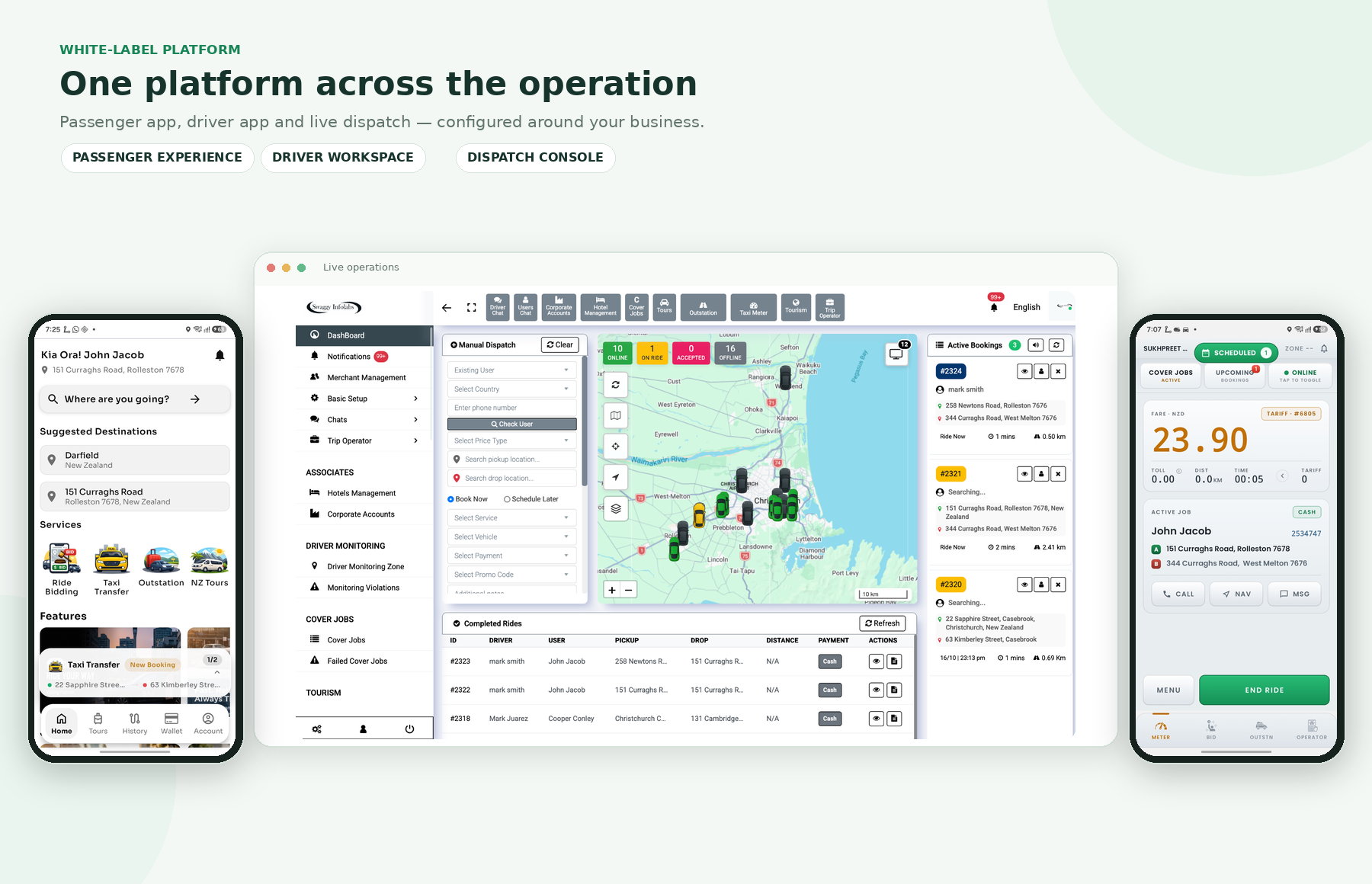
Explore the supplied product screens by role. Use the tabs, arrows or step markers; swipe on touch screens. Open any image to see it at full size.
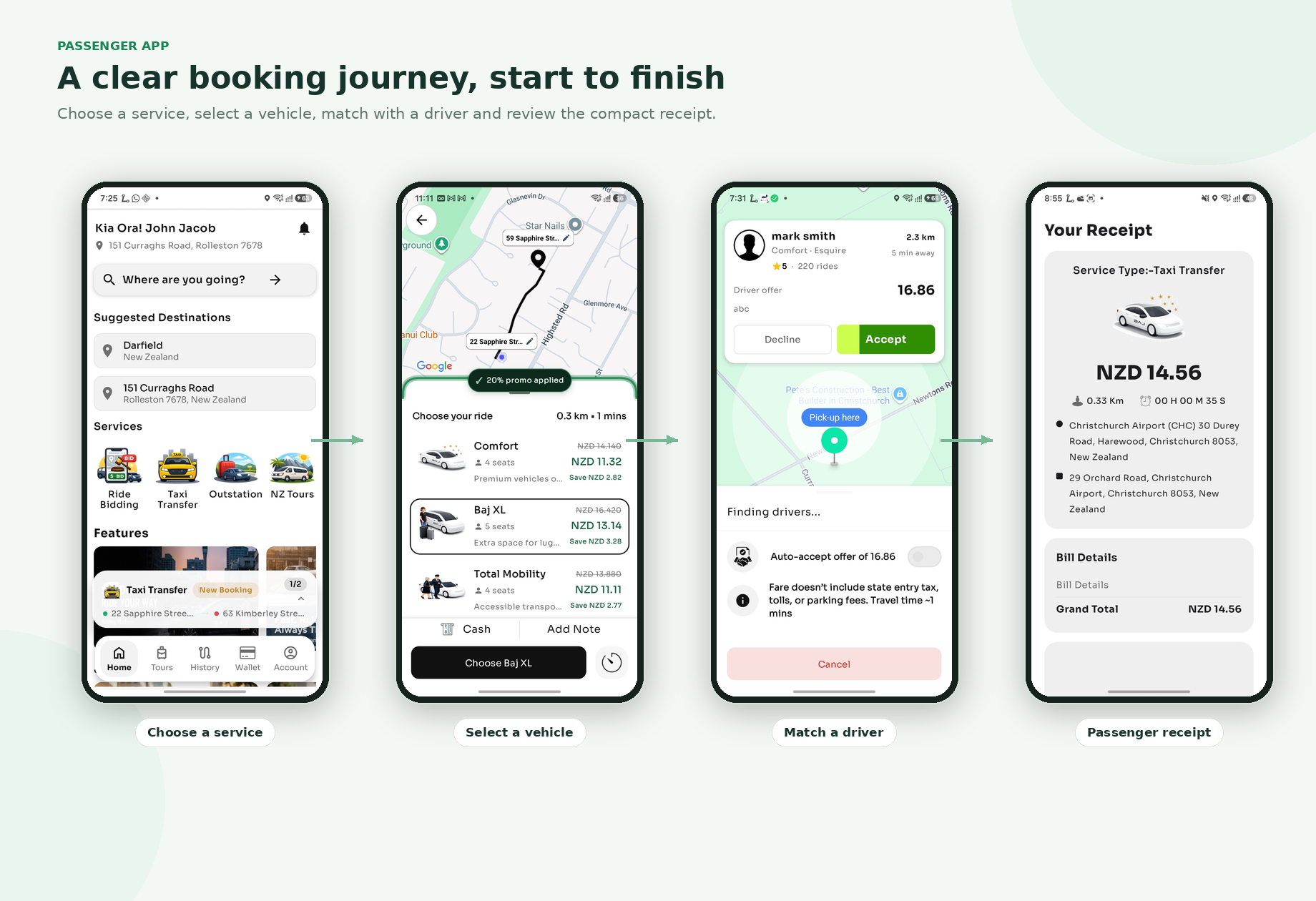
From booking choice to a clear trip record
Follow the passenger-facing journey and inspect the trip receipt visual.
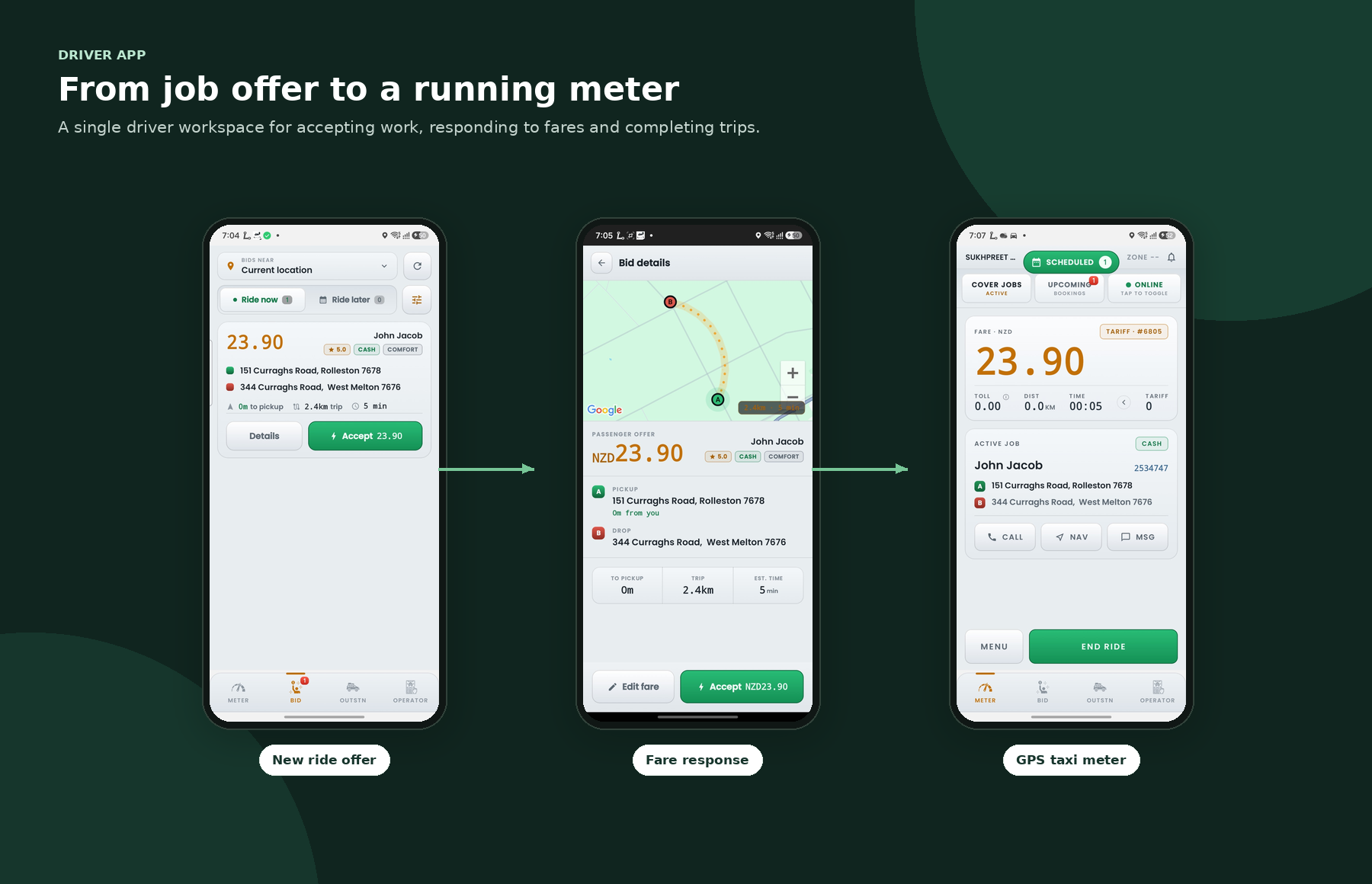
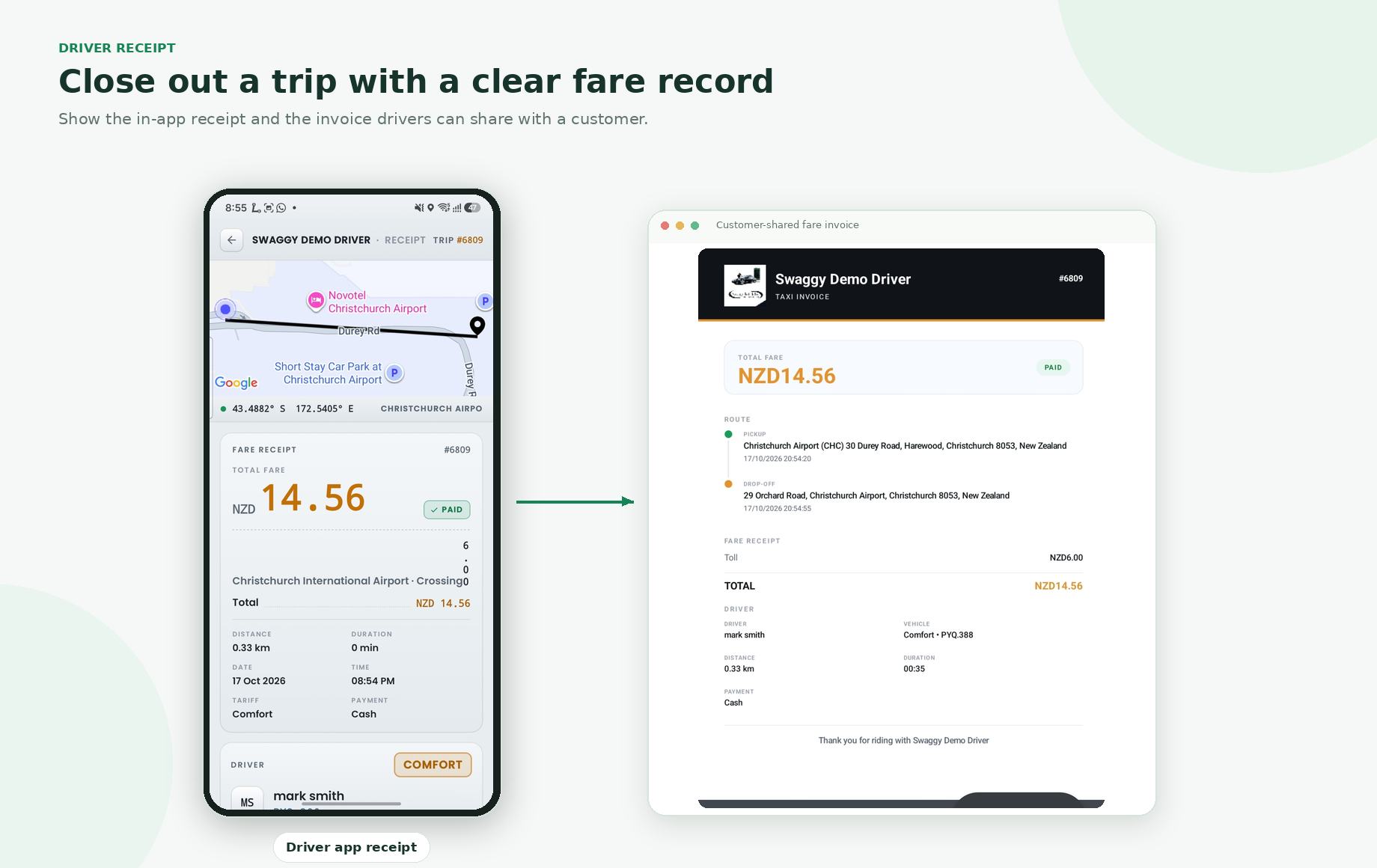
Job response, fare tools and trip close-out
See the driver-side workflow and a shareable trip record.
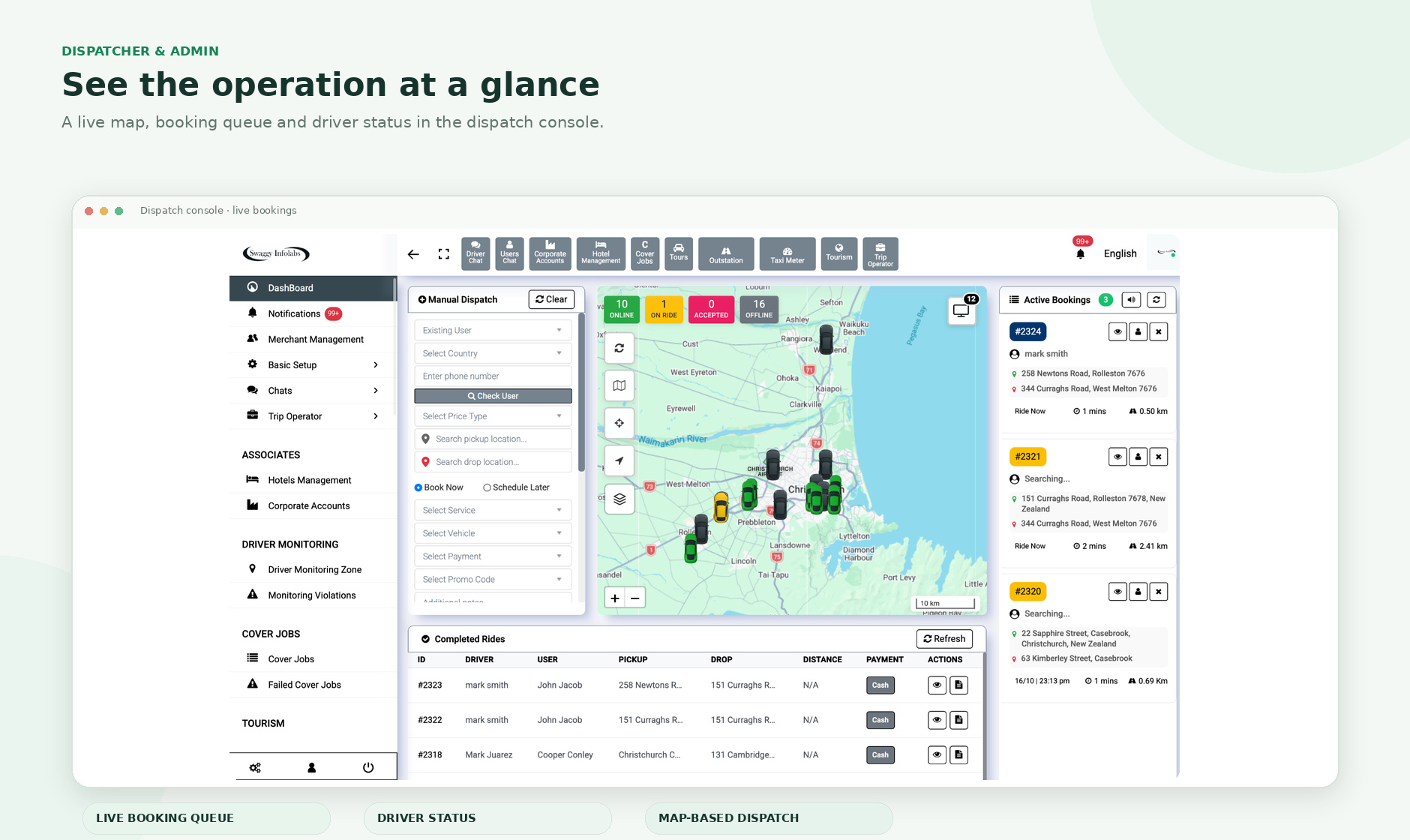
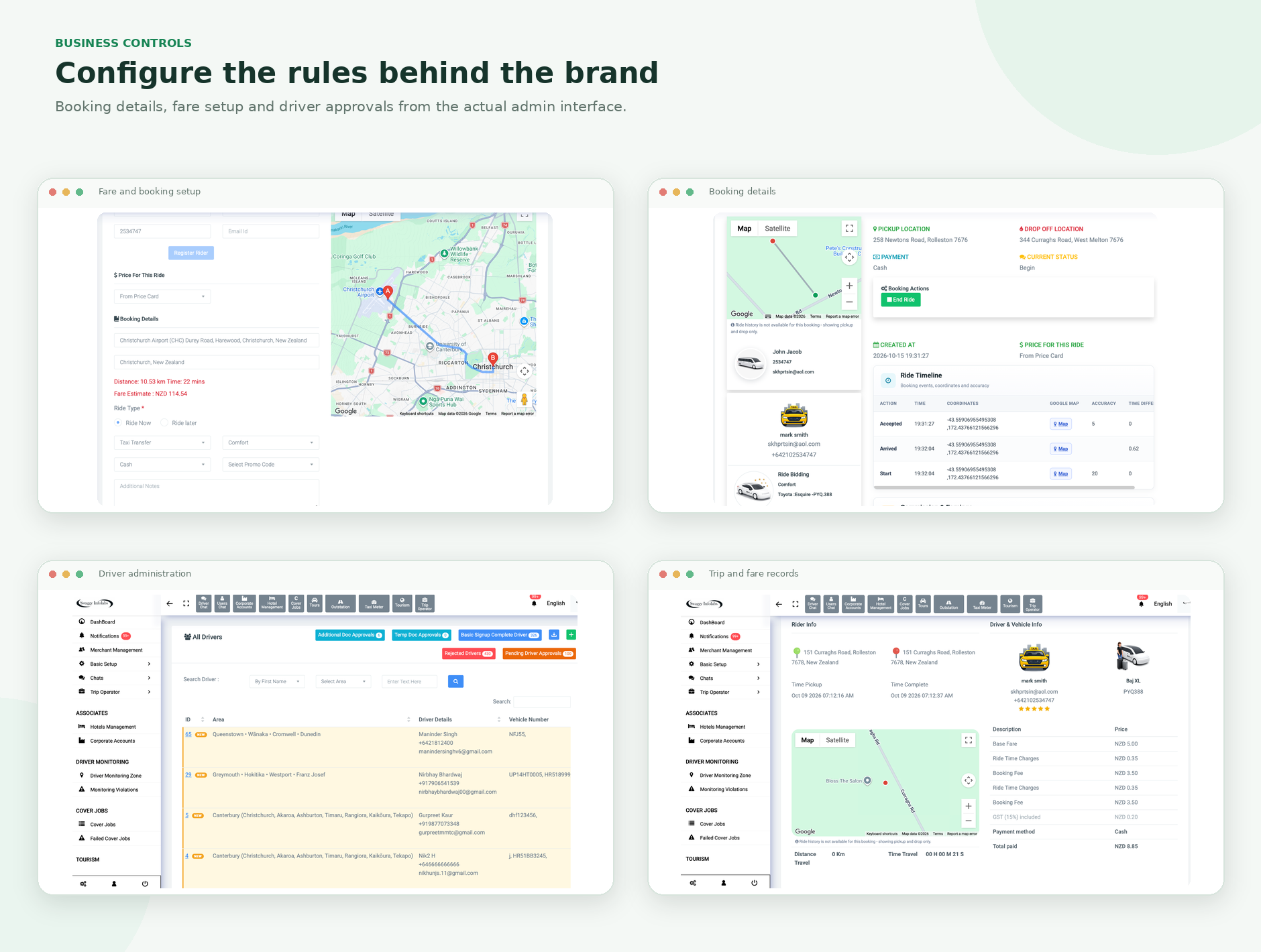
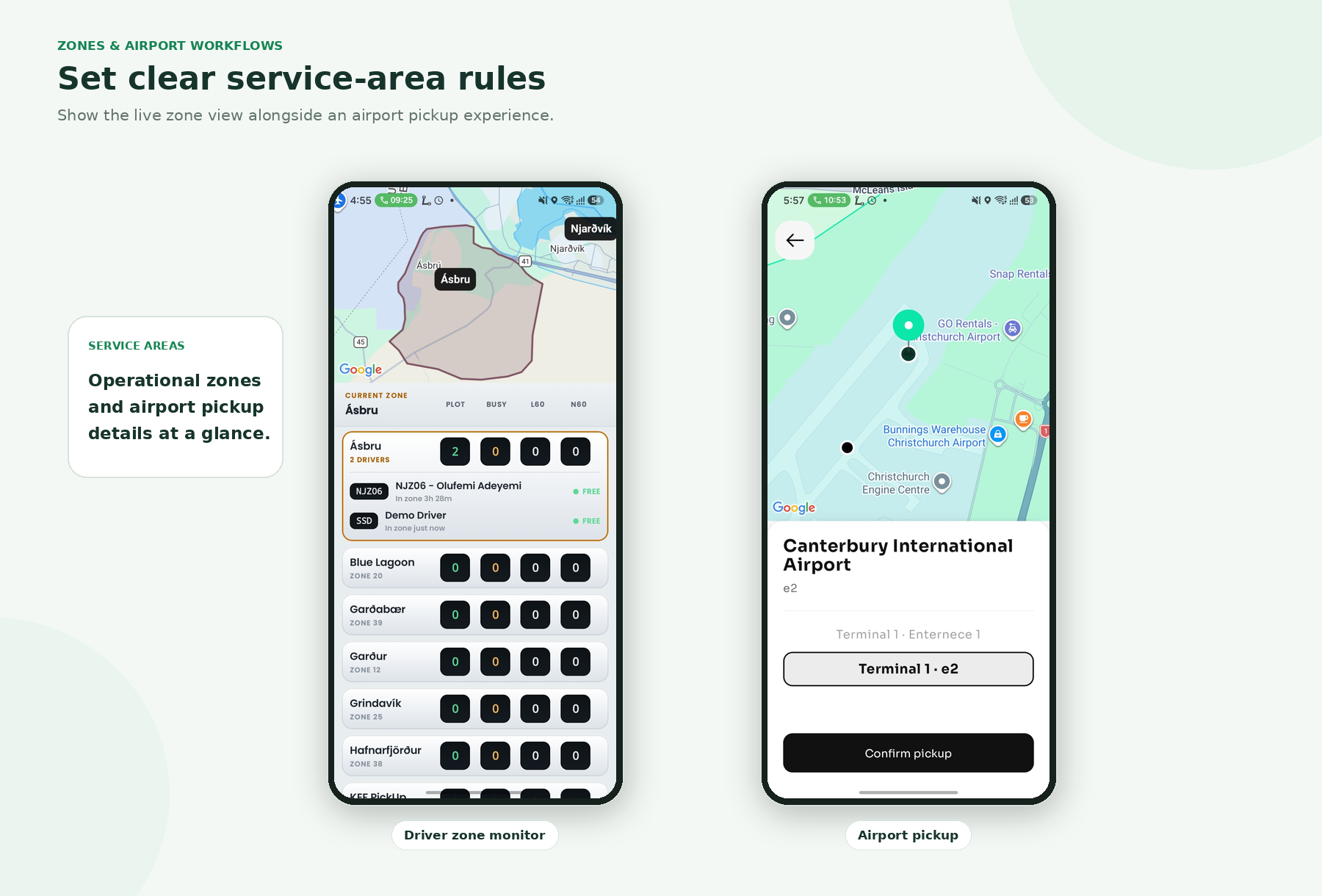
See what the operating team can review
Move through dispatch, admin and zone or airport workflow visuals.
Extend booking beyond the passenger app
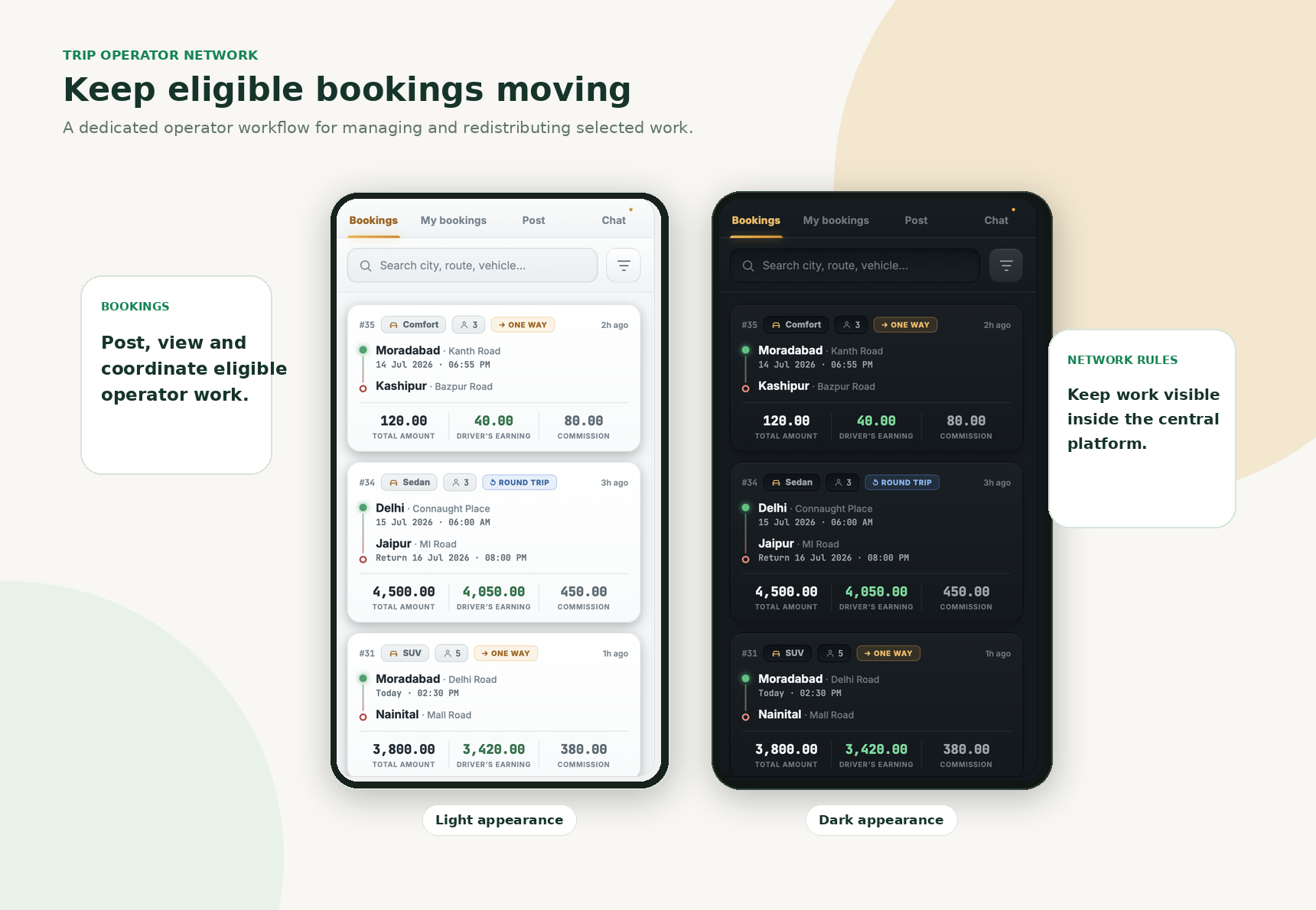
Explore operator coordination, reception booking and intercity service screens.
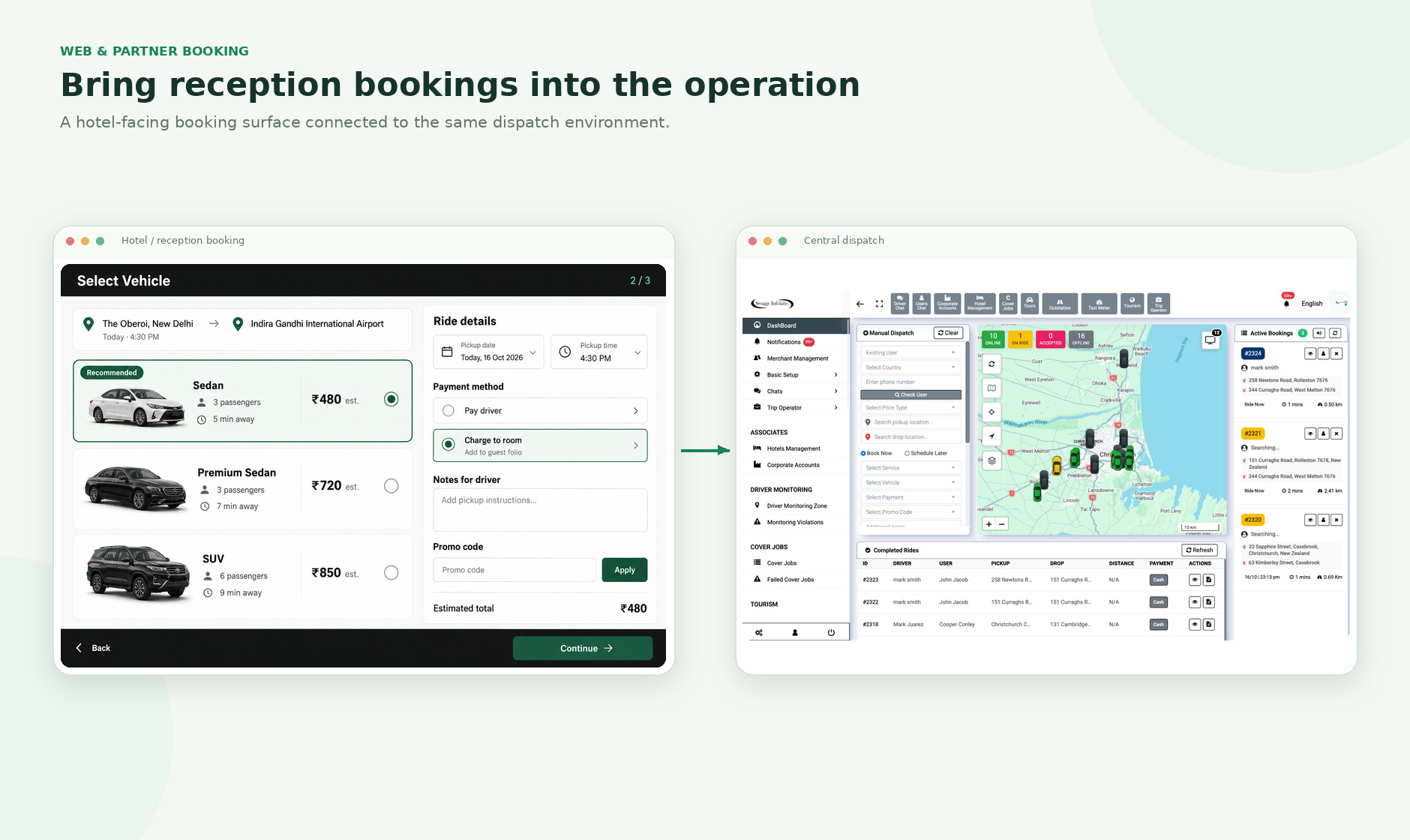
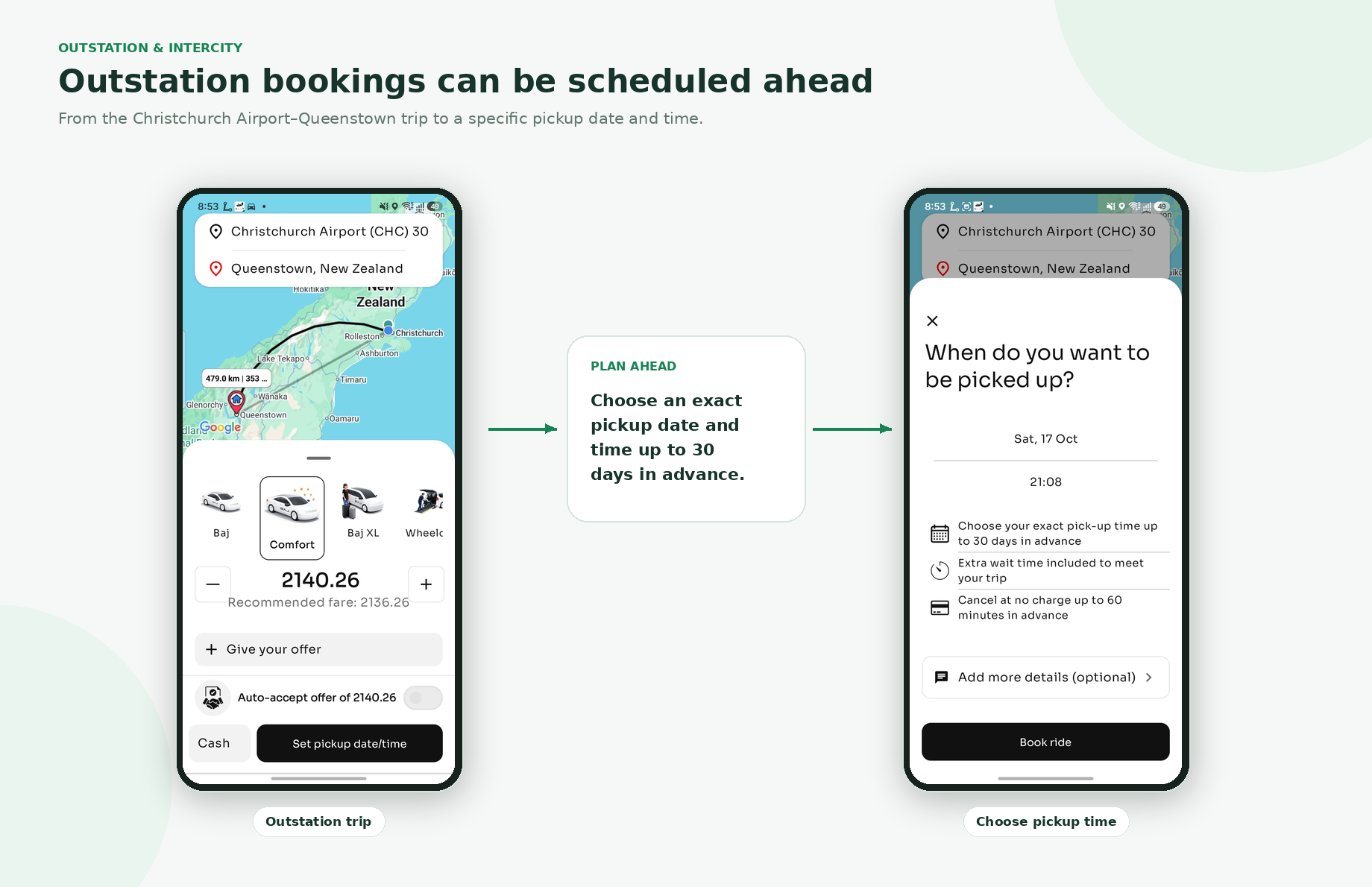
These are supplied product visuals. The screen layout is shown in full; the gallery does not crop or redraw the interface.
A CUSTOMER EXPERIENCE UNDER YOUR NAME
Keep the booking journey recognisably yours
Give customers a branded way to request a trip, choose an eligible service and follow booking progress. The exact features depend on the modules selected for deployment.
- Pickup, destination and service selection
- Ride now and scheduled options where enabled
- Fare estimate or service-specific price display
- Driver assignment, trip status and receipts
- Payment, promotion and support elements as configured
ONE WORKSPACE FOR DRIVER OPERATIONS
Give drivers a clearer way to work
Connect booking offers, trip progress and fare tools in a driver app configured for the operator’s service model.
- Availability and driver status
- Eligible booking details and responses
- Pickup, arrival, trip-start and completion flow
- GPS meter or fare tools where configured
- Documents, notifications and wallet information where enabled
Control the operation
behind the brand
Bring bookings, drivers, vehicles, zones, fares and service settings into the operational workspace.
- Live booking queue and trip history
- Driver and vehicle visibility on the map
- Automatic or manual allocation options
- Service categories, fares and zones
- Document, payment and reporting controls where configured
MORE WAYS TO CREATE A BOOKING
From a reception desk into the same dispatch flow
Connect web booking and simplified hotel or reception workflows to the dispatch environment. Partner staff can request transport without re-entering the booking in a separate office tool.
Useful for approved hotel, hospital, restaurant, tourism or reception partners. Availability and interface scope are confirmed for each deployment.
See this workflow in a demo →A DIFFERENTIATED OPERATING MODEL
Keep eligible bookings moving across a wider network
For approved workflows, operators or drivers can manage and redistribute selected trips under platform rules, with booking visibility retained in the central system.
FLEXIBLE PRICING LOGIC
Offer bidding without making it the only fare model
Ride bidding can be a separate service for eligible instant trips. Standard taxi, scheduled, airport and outstation bookings can continue using their own pricing logic.
Long-distance bookings can use dedicated trip types and dispatch considerations, based on the selected deployment.
Ask to see both booking flows →COMMERCIAL CONTROLS THAT MATCH THE SERVICE
Configure pricing and payment for your model
Taxi, ride-hailing, airport and outstation services may need different fare logic. The platform can be configured around the selected service mix and payment gateway.
- Base, minimum, distance and time parameters
- Vehicle, service and zone pricing
- Configured tolls, extras or trip charges
- Card, cash or driver-direct methods where permitted
- Wallet, commission and settlement workflows when included
COUNTRY-READY SETUP
Configure for the market.
Don’t assume every country is the same.
Payment flows, GST or equivalent local tax treatment, invoices, platform fees and transport requirements can vary by country and business model. The setup can be scoped around the country requirements confirmed during discovery. Confirm tax rates, treatment and reporting with a qualified local adviser before launch; configuration does not replace professional tax advice.
SERVICE AREAS WITH OPERATIONAL CONTEXT
Define where services operate and how they work
Configured zones can support service areas, airport pickup points, city boundaries or selected operating rules. Airport workflows can include pickup information and flight-related data when a suitable provider is agreed.
Monitoring and notifications should be configured for a legitimate operational purpose and aligned with local privacy requirements.
Build operational checks into the workflow
Driver and vehicle records can be organised around the market and service model. Configure approval and expiry processes according to the operator’s requirements.
Driver records
Identity, licence-related information and market-specific endorsements where required.
Vehicle eligibility
Registration, service category and inspection or insurance records as applicable.
Approval & expiry
Manual review, expiry dates and renewal reminders where configured.
Operational permissions
Access can be restricted when required documentation expires, where that workflow is enabled.
A DRIVER WORKFLOW, NOT A SEPARATE ISLAND
Connect GPS fare tools to the trip record
Swaggy’s GPS-based taxi-meter technology is designed to continue fare calculation from device location data during temporary connectivity issues and synchronise trip information when the connection returns, depending on the deployed configuration.
Show the live meter and its operating conditions in the product demo. Link this section to the dedicated GPS Taxi Meter page once its URL is confirmed.
Request a meter walkthrough →PRODUCT SCREEN OVERVIEWOpen the supplied screen overview+
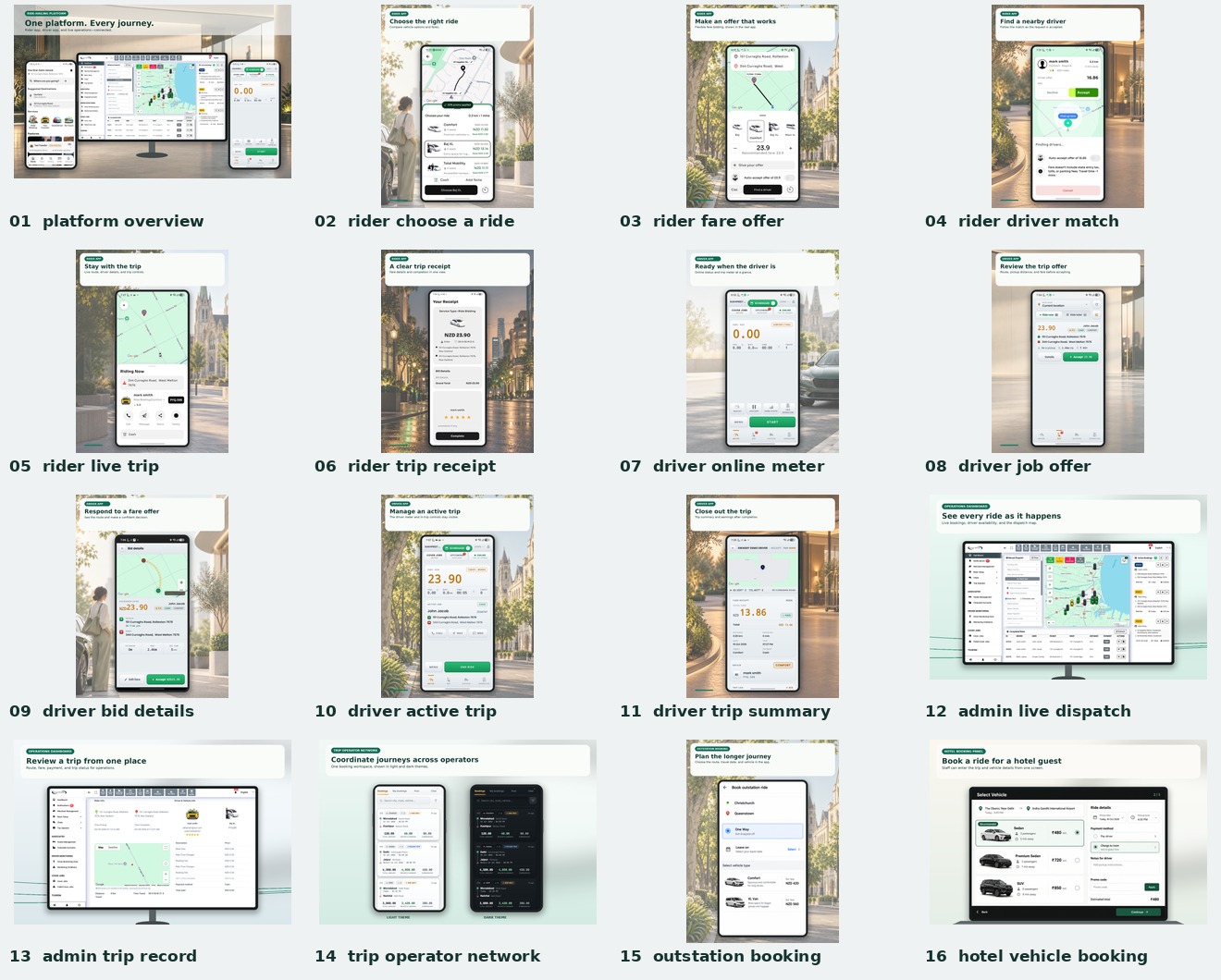
Connect the tools your business actually needs
Agree the integration scope, provider, usage costs and ownership before implementation.
Maps & location
Address search, routing, ETA and trip maps through the selected provider.
Payments
Card transactions and settlement-related flows based on gateway capability.
Messaging
OTP, booking alerts and operational messages through agreed providers.
Business systems
Accounting, CRM, ERP, flight or travel APIs can be evaluated for project scope.
A BROADER TRAVEL JOURNEY
Connect local rides with more of the trip
For businesses expanding beyond point-to-point travel, mobility can be connected with transfers, tours or other travel products. BAJ in New Zealand is a reference point for this direction; a comparable client setup should be scoped around its own suppliers and business model.
Tourism or OTA functionality is not assumed to be included in every white-label package.
TRANSPORT
Make hosting, data and source-code terms clear before launch
These are commercial choices to define in the proposal—not automatic promises attached to the phrase “white-label.”
Hosting
Managed or client-controlled infrastructure, with responsibilities agreed.
App publishing
Developer-account ownership and store submission arrangements confirmed.
Repository & handover
Source-code access, handover and transition support defined in writing.
Data & support
Business data, backups, maintenance and support responsibilities documented.
MOVE FORWARD WITHOUT IGNORING WHAT ALREADY WORKS
Modernise a fleet with a planned migration
An established operator may already have a known brand, drivers, clients and fare knowledge. Migration can be scoped by reviewing available exports, data quality, privacy duties, vendor restrictions and integrations that need to stay or change.
Talk through your current setup →For transport businesses ready to own the experience
Start with the operating need, then choose the modules. A new startup and an established fleet may need different scopes.
Taxi companies
Modernise customer booking and dispatch while retaining a known local brand.
Private-hire & chauffeur operators
Bring advance rides, vehicle classes and airport work under one configured system.
Ride-hailing startups
Scope a rider, driver and operations stack around the intended market entry.
Driver & operator networks
Coordinate approved work across a broader network with central visibility.
Airport & intercity businesses
Support transfers and longer-distance trips alongside local transport.
Travel businesses
Explore connections between ground transport and tourism products.
Start with real mobility workflows. Configure the fit.
The goal is not to copy another company screen by screen. It is to configure proven product workflows around the business you want to operate.
From business brief to operational launch
Define scope before committing to a delivery schedule. Integrations, market rules, testing and app-store review affect the plan.
Brand & discovery
Target market, services, fleet, drivers and booking channels.
Select modules
Apps, dispatch, kiosk, bidding, operator network, meter and more.
Configure rules
Brand, zones, categories, fares, fees and notifications.
Integrate & test
Verify booking lifecycle, allocation, payments and operations.
Deploy & expand
Follow the agreed hosting, publishing, handover and support model.
CLEAR ANSWERS FOR BUYERS
Questions before you choose a platform
Project details vary by market, modules and commercial agreement. The demo and proposal should confirm what is included.
What is a white-label taxi app?
A passenger, driver and operations platform configured to operate under a transport company’s brand. The underlying technology manages bookings, dispatch, location, fares, payments and administration according to the selected scope.
Can the passenger and driver apps use our company name and logo?
Branding can be applied to the agreed mobile and web surfaces. App-store publishing, developer-account ownership and brand assets should be confirmed during project setup and remain subject to Apple and Google policies.
Is Swaggy only for taxi companies?
No. The platform can be configured for taxi, private hire, ride-hailing, airport transfer, driver networks, intercity travel and wider mobility businesses. Tourism modules can be scoped for a broader marketplace.
Can we offer both standard taxi bookings and ride bidding?
Yes, where both services are selected. Bidding can operate for eligible trips while standard taxi, scheduled, airport or other bookings use their own pricing and dispatch rules.
Can we set our own fares and service zones?
Service categories, fares, minimums, distance/time parameters and zones can be configured according to the selected modules. Market-specific transport rules remain the operator’s responsibility.
Can we charge a customer booking or processing fee?
The technology can support configured customer fees where appropriate. Whether a fee or surcharge is allowed depends on local law and the payment provider; confirm the rules before configuration.
Can hotels book taxis without the passenger app?
A web or simplified reception booking interface can connect to the same dispatch environment, so partner locations can create bookings without asking every passenger to install the app.
Can a booking be redistributed through the Trip Operator Network?
Selected bookings can be managed or redistributed through an approved workflow under platform rules, with booking visibility retained in the central system.
Do we automatically receive the source code?
No automatic source-code handover is promised. Repository access, deployment, hosting and handover arrangements are commercial terms to define in the project proposal.
Can the platform be configured for another country?
Market-specific setup can be scoped for payments, tax, transport rules, messaging and app-store requirements. Each country requires its own review; one configuration should not be assumed to fit every market.
Can we migrate from our current taxi dispatch software?
Migration can be assessed based on the existing provider, export formats, data quality, privacy obligations and integrations that need to remain or be replaced.
How long does a white-label launch take?
Timing depends on branding, modules, custom work, integrations, testing, app-store review and local requirements. Swaggy should provide a project-specific delivery plan after the scope is confirmed.
YOUR BRAND · YOUR OPERATING MODEL
Launch mobility technology on your terms.
See the passenger app, driver app, dispatch, reception booking, operator workflows and GPS fare tools in one product walkthrough.
INFO LABS