YOUR BRAND · THE PASSENGER JOURNEY
Taxi Passenger Booking App for Modern Taxi & Ride-Hailing Services
Give customers one branded place to request, schedule, bid for and manage rides. Swaggy Info Labs develops taxi booking app software for taxi companies, ride-hailing platforms and private-hire businesses, connecting passenger choices to your dispatch, service and fare rules.
- Ride Now and scheduled travel
- Fare choice and clear trip status
- Connected to operator dispatch
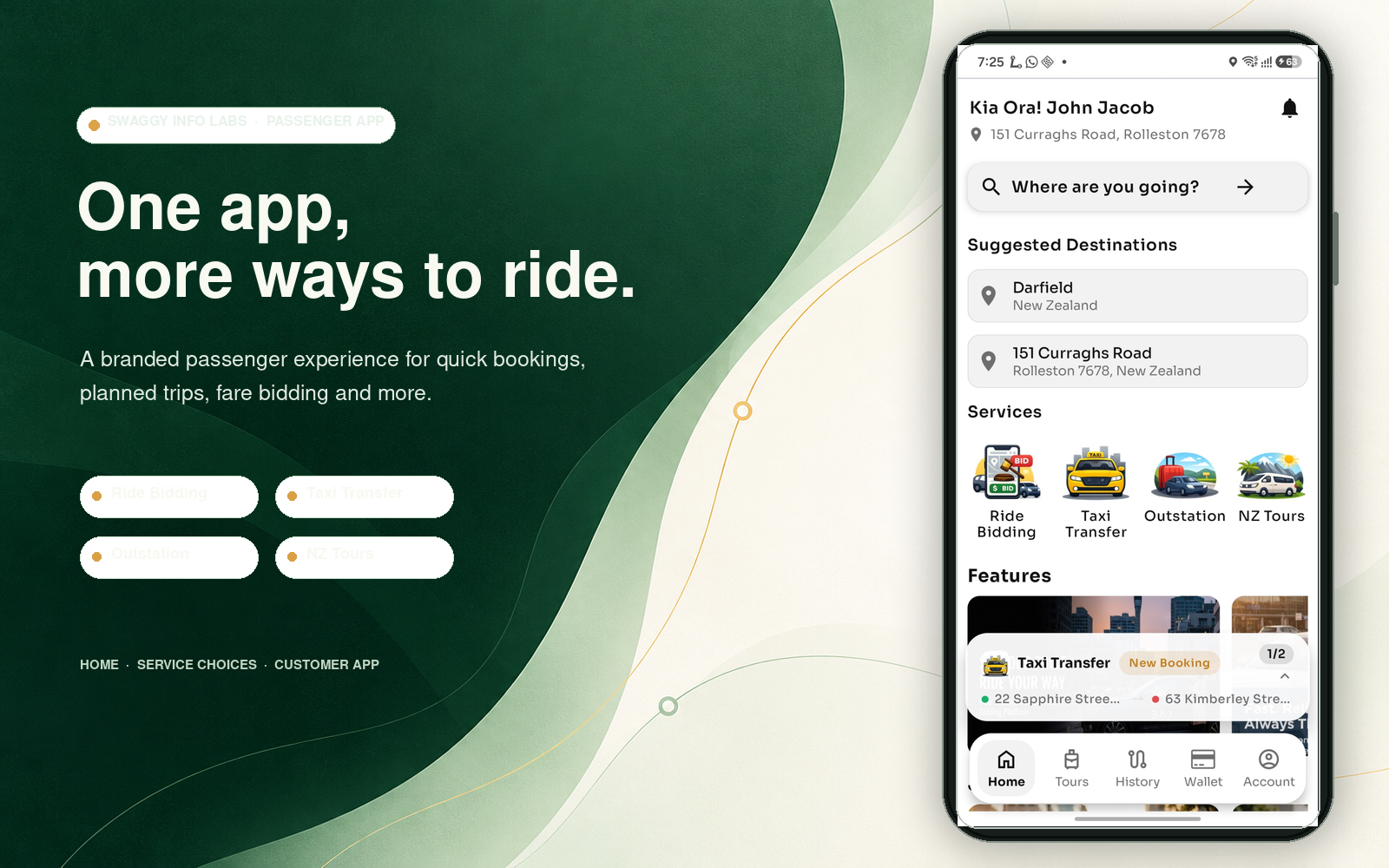
Branding, available ride types and booking rules are agreed for each deployment. See how passenger bookings connect to the taxi dispatch platform and the ride-hailing platform.
From the first location entry to the trip record.
START WITH THE JOURNEY
A customer booking app should make the next choice clear.
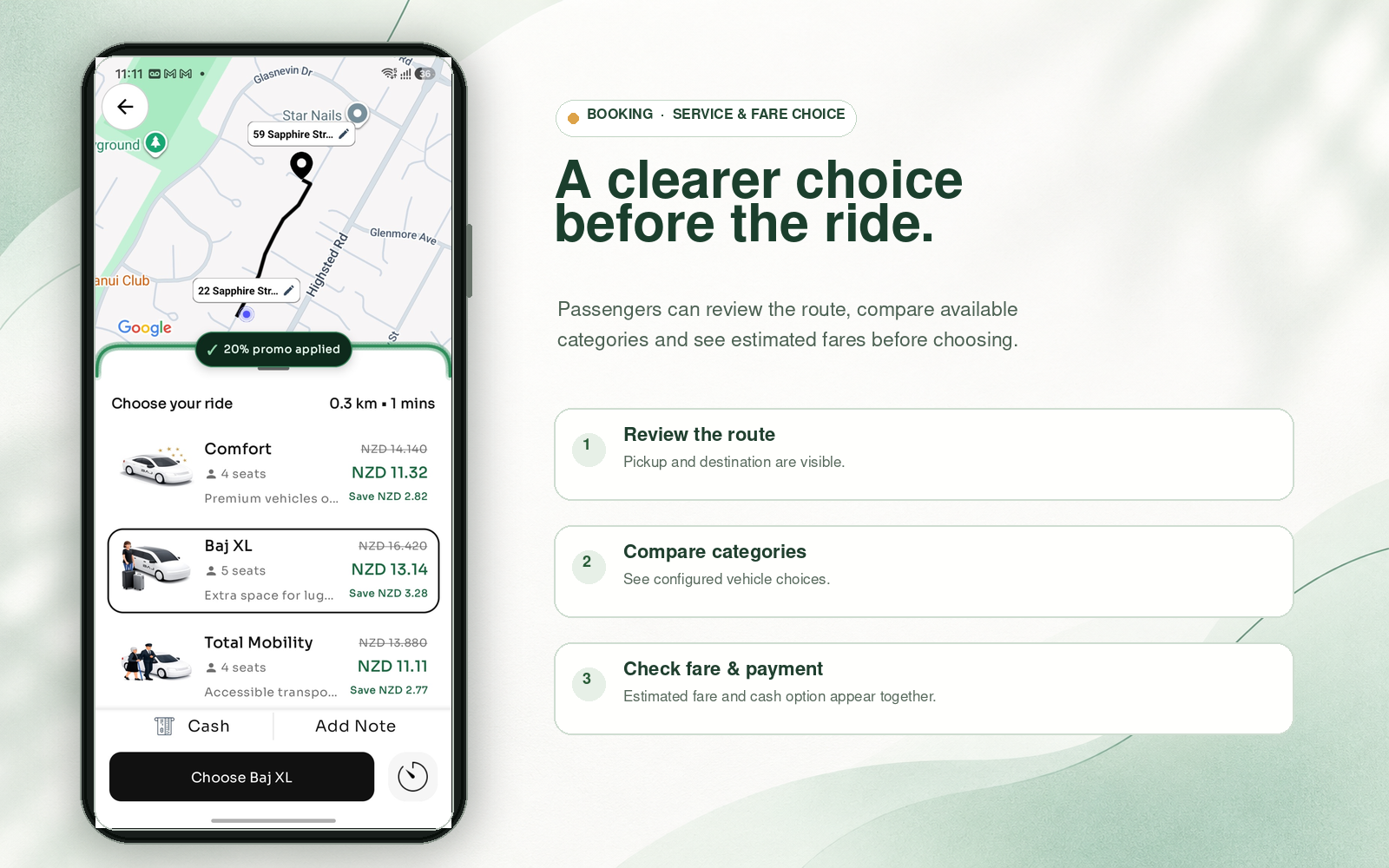
PICKUP → DESTINATION → RELEVANT OPTIONS
Make the booking feel simple. Keep the rules connected.
The passenger journey begins with pickup and destination. The app can then show service types and vehicle categories that fit the location, journey and operator setup, rather than displaying choices the customer cannot actually book.
- Mobile registration and OTP sign-in where enabled
- Pickup and destination entry with map support
- Ride types and vehicle choices based on configured eligibility
- An estimate, quote, meter explanation or bidding amount that matches the selected service
For teams evaluating a taxi booking app for customers, saved places, profile details and preferred payment options can make repeat bookings quicker where enabled.
IMMEDIATE OR PLANNED
Offer the right booking for the time of travel.
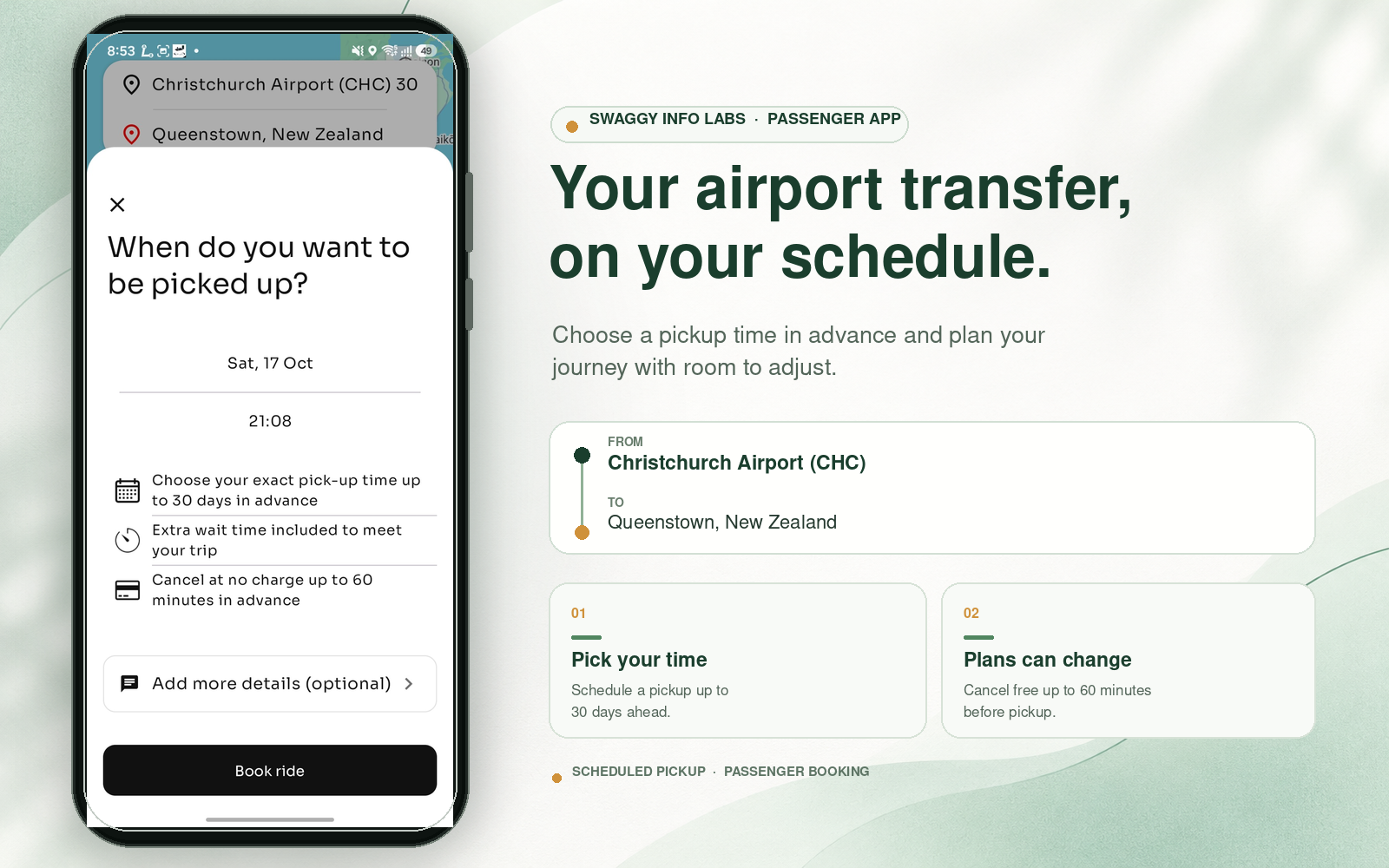
Ride Now supports immediate demand. Scheduled booking lets passengers plan ahead for eligible services, subject to the operator’s availability and scheduling rules. Keep these paths distinct so a customer can see whether a trip is being requested now or arranged for later.
Ride Now
Submit an immediate request and follow its dispatch status.
Scheduled ride
Choose a future date and time for a service that accepts advance bookings.
Fare bidding in the described marketplace model applies to eligible instant rides; do not present it as a scheduled booking feature unless a specific deployment supports that.
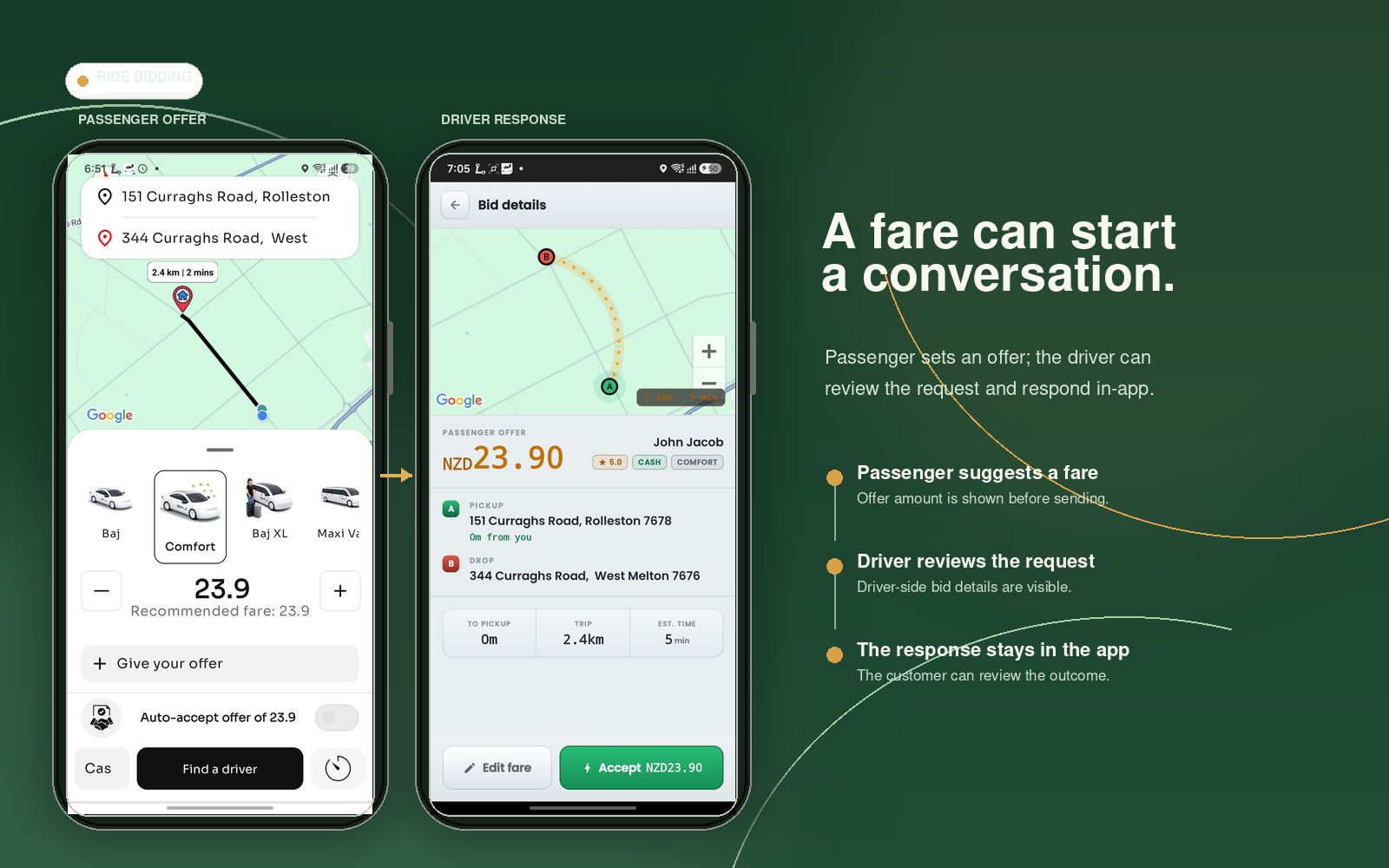
A FARE CAN START A CONVERSATION
Let passengers suggest a fare for eligible instant rides.
Ride bidding can sit alongside conventional taxi and ride-hailing bookings. A passenger proposes an amount; eligible drivers can accept or counter according to the configured marketplace rules. The passenger can then choose from an available response.
- Passenger sets a fareFor a service and trip that allow bidding.
- Driver respondsAccept the offer or return a counter-offer, if enabled.
- Passenger decidesProceed with an available response or continue looking.
Bidding rules, availability and status wording depend on the deployment.
PRICE CLARITY BEFORE CONFIRMATION
Show a fare that reflects the service selected.
Depending on the operator’s model, the app can present an estimate, a quoted transfer price, a meter-based explanation, a bidding amount or another configured fare treatment. Fare logic may use category, distance, time, zone, minimums, toll treatment or other approved business rules.
Where local requirements and the payment provider permit a separate platform, convenience or processing fee, show it before confirmation and reflect it accurately in the final trip record. The client is responsible for confirming the legal, tax and commercial treatment in each market.
KEEP THE CUSTOMER INFORMED
Make booking status mean something.
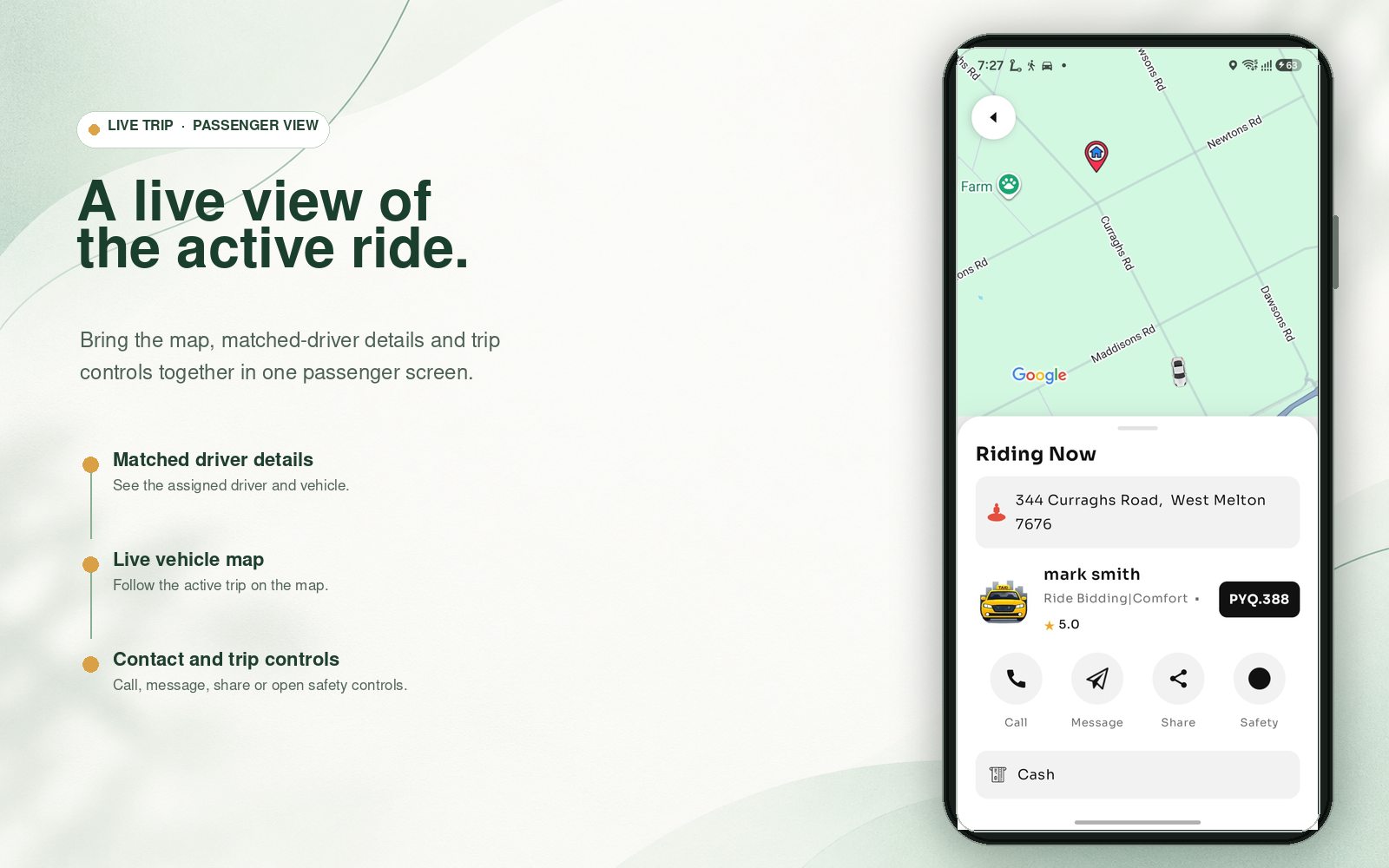
After the passenger requests a ride, the app can show clear stages such as waiting for a driver, assigned, approaching, arrived, started and completed. When live tracking is enabled, the map can show the assigned vehicle’s progress during the relevant part of the trip.
Driver and vehicle details should be limited to information the operator chooses to display. Location sharing, timing and retention must follow the deployment’s operating and privacy settings.
BEYOND THE CITY
Take the same customer account on longer journeys.
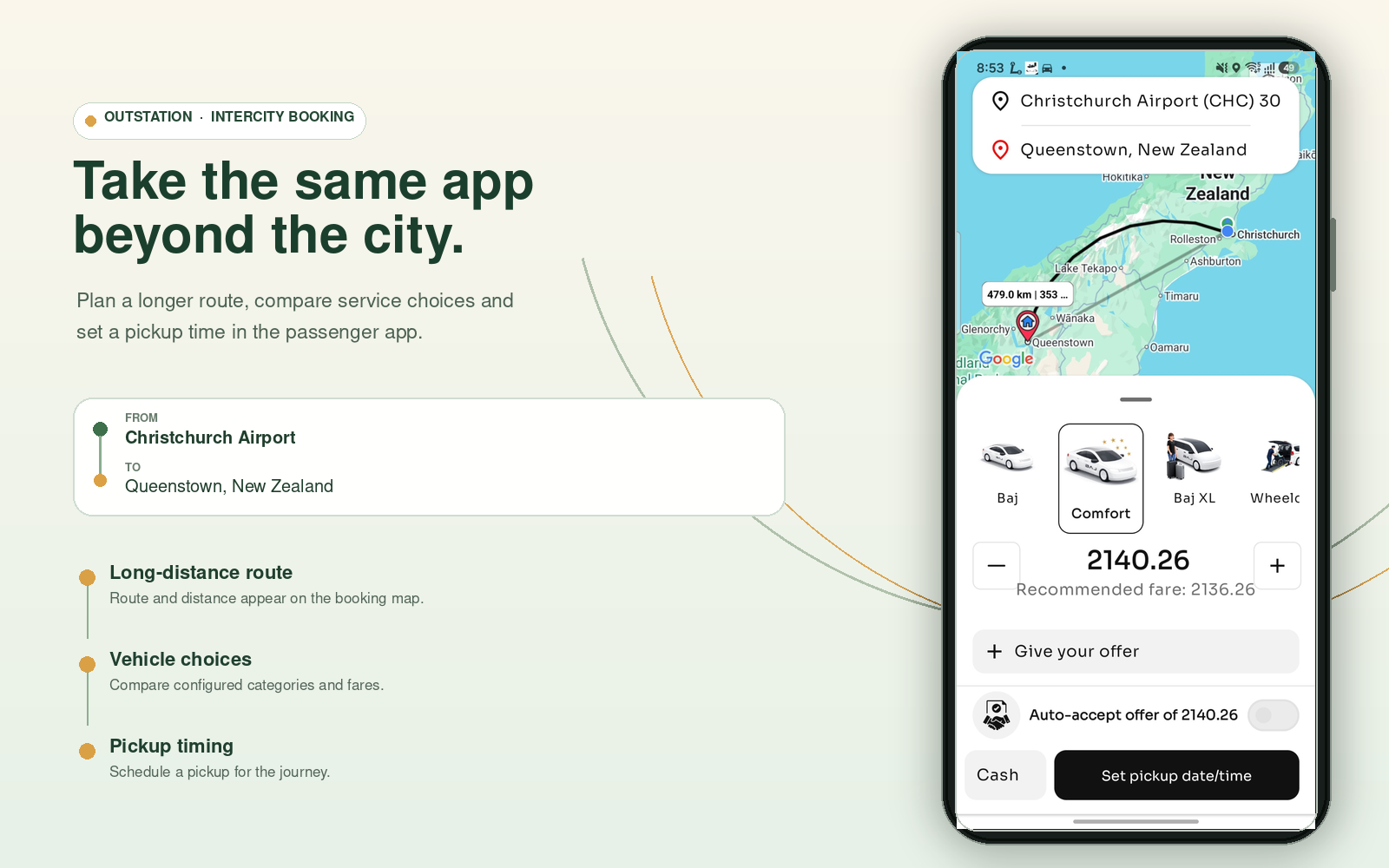
Outstation and intercity trips have different distances, service areas, prices and planning needs from a short urban ride. A configured long-distance workflow can let passengers enter a route, select an eligible vehicle, review the applicable fare treatment and request or schedule travel.
Distance and route thresholds should be defined by the operator for each service. The app should not imply one global outstation rule for every market.
- Long-distance route and journey information
- Vehicle choices tied to the operator’s actual fleet
- Configured one-way, return or other trip types where offered
AIRPORTS NEED MORE CONTEXT
Help passengers choose the right pickup point.
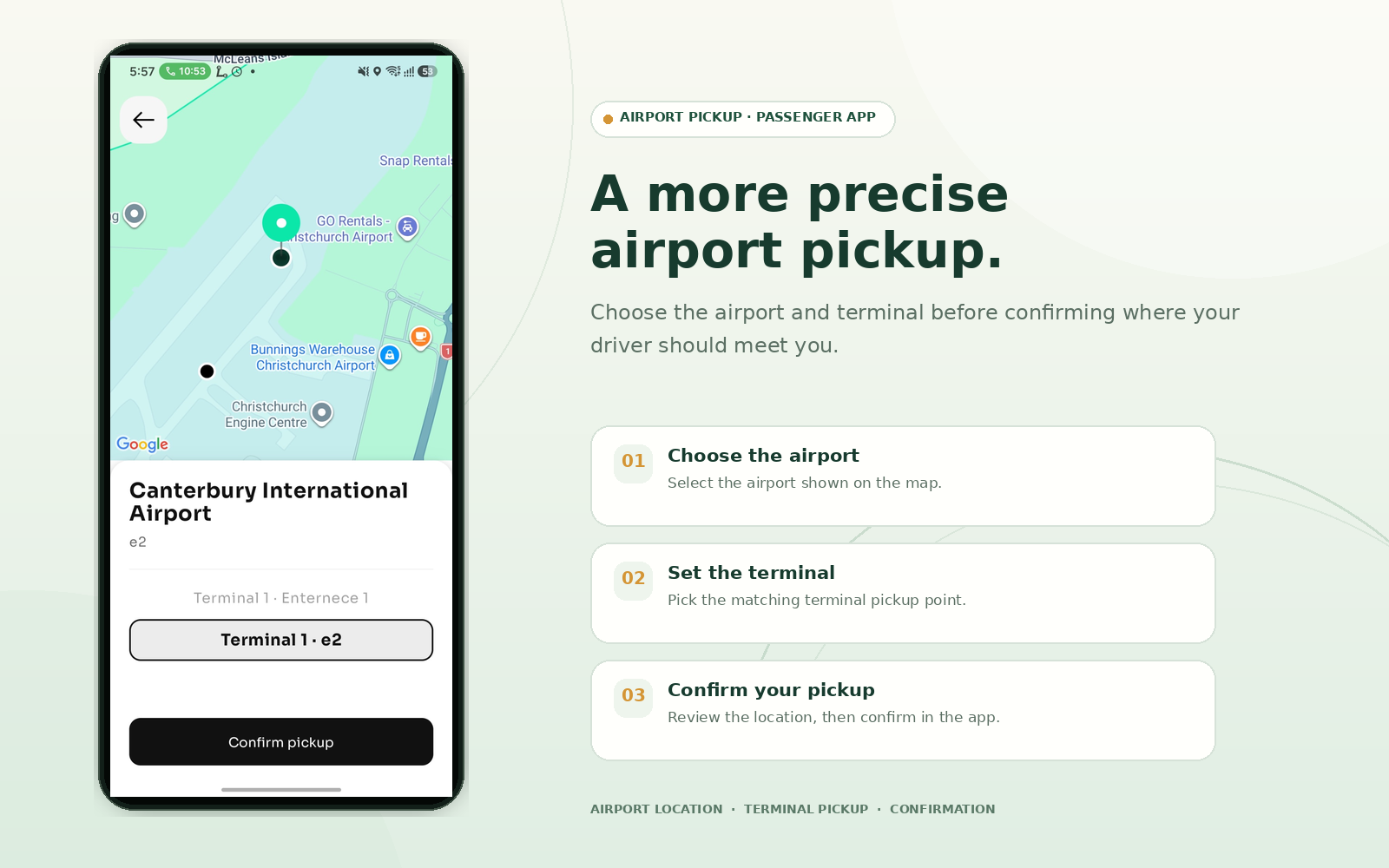
Airport journeys can use location-specific information, meeting instructions, terminal or pickup guidance and booking rules configured by the operator. Where a suitable data integration is included, flight-related information can be surfaced for the covered airports. Provider, coverage and operating details must be confirmed for each deployment.
AFTER THE RIDE
Give every completed trip a useful record.
Passengers can refer to trip history instead of relying on memory or screenshots. Where the selected configuration supports it, a receipt may include the booking reference, journey details, service type, fare components, applicable fees or tax information and payment method.
Keep the receipt aligned with the actual payment and settlement model. The app should not be described as tax-accounting software unless that function is included.
Explore payment choices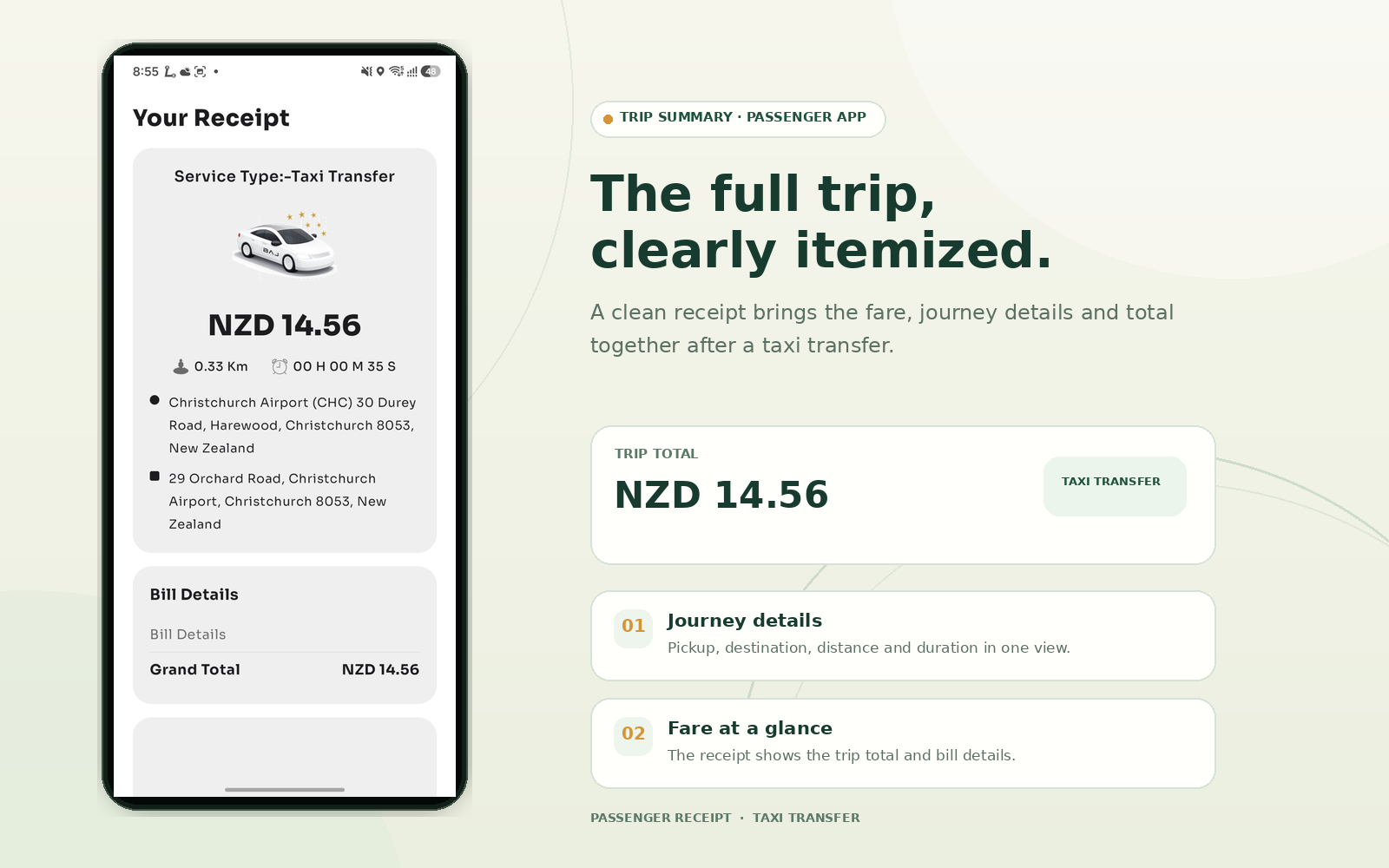
PAYMENT OPTIONS THAT FIT
Connect checkout to your operating model.
Payment choices and transaction records depend on the operator’s commercial model, supported providers and market setup. Configure the customer experience and settlement logic together.
Gateway payments
Connect supported digital payment providers when the agreement, country and integration scope are confirmed.
Cash or direct payment
Support operator-approved options such as cash or driver EFTPOS where the chosen model allows them.
Optional customer wallet
Enable stored balance, funding or wallet payments only when they suit the project and local requirements.
Promos and referrals
Where configured, connect codes or referrals to the same pricing and reporting logic as the booking.
Operational notifications, consent wording, support, cancellations and promotional messages should be configured as separate, clearly understood customer journeys. Named SMS, WhatsApp, maps, banking or payment integrations are not promised unless included in the offered build.
NOT EVERY BOOKING STARTS IN AN APP
Connect app bookings with other customer touchpoints.
A hotel, reception desk or kiosk can use a separate booking interface while sending a transport request into the same dispatch environment. This can help hotels, serviced apartments, hospitals and tourism desks arrange guest transport without maintaining a disconnected taxi workflow.
Where mobility and tourism modules are deployed together, a wider customer account can connect local rides, transfers, tours or activities. Keep the scope clear: the handoff, supplier inventory and fulfilment process must be confirmed for the project.
or guest
workflow
service
Illustrative connection between booking channels and configured services.
YOUR BRAND, YOUR SERVICE MIX
Design the experience around the fleet you operate.
Taxi passenger app development can deliver a white-label taxi booking app using the client’s approved name, logo, colours, categories and customer terminology. Branding and the booking flow should reflect the business behind the app, not just replace a logo on a generic screen.
Category names and capacity rules should map to real available vehicles and operator eligibility, so passengers are offered choices they can actually book.
Everyday and premium rides
Standard, comfort or other service levels where the operator offers them.
Groups and larger vehicles
XL, maxi or van options tied to vehicle capacity and availability.
Accessible transport
Wheelchair-accessible or specialised categories linked to approved supply where provided.
Taxi and private hire
Metered, quoted, scheduled or other service workflows configured for the business.
COUNTRY CONFIGURATION
Configure the booking around the market you serve.
Currency, tax fields, fee presentation, payment methods, receipt details and settlement records may need to change across countries and business models. The app should show the customer the result of the agreed configuration—not assume one global rule applies everywhere.
Keep passenger charges, platform fees and driver or supplier amounts distinct where the model requires it.
Configure the tax and receipt workflow to documented client requirements and local professional advice.
Agree which provider, direct-payment options and settlement responsibilities apply to the deployment.
Show any permitted additional charge before confirmation and on the appropriate trip record.
Swaggy can configure technology around documented market requirements. This is not a guarantee of legal or tax compliance; the client remains responsible for local approvals and professional advice.
PASSENGER CHOICES BECOME OPERATIONS
A booking app works best when it is connected to dispatch.
Vehicle eligibility, service area, fare model, driver availability and booking type all shape whether a request can be offered correctly. The passenger interface can stay clear while the wider platform applies the operator’s configured rules.
Explore the taxi dispatch platformBUILT AROUND THE CUSTOMER SIDE
For operators who need more than a booking button.
Page 06 is about the customer-facing booking experience. It complements the full dispatch and ride-hailing platform pages instead of repeating the broad “launch an Uber-like business” pitch.
Taxi and private-hire companies
Add branded app bookings while connecting requests to existing dispatch and service rules.
Ride-hailing marketplaces
Present immediate bookings, eligible bidding and other chosen ride models through a customer app.
Airport and transfer operators
Support planned trips with airport guidance and live status where configured.
Intercity and accessible services
Show long-distance or specialised categories tied to the operator’s actual service and vehicle eligibility.
Hospitality and tourism businesses
Connect guest booking channels and transport journeys where those interfaces are included.
Multi-service mobility brands
Manage a selected mix of taxi, ride-hailing, scheduled, airport and other mobility services.
FROM REQUIREMENTS TO RELEASE
Configure the passenger app around real journeys.
Start with how the business books, fulfils and settles each trip. Then agree which features are standard, configured or custom in the offered project.
Map the business
Confirm service areas, ride types, fare models, customer support and payment flows.
Set brand and booking choices
Agree app identity, categories, booking steps, customer information and consent wording.
Connect dispatch and payments
Scope driver eligibility, dispatch rules, provider integrations, fees, wallet and settlement logic.
Test actual scenarios
Check Ride Now, scheduled, bidding, airport, outstation, failed match, cancellation and payment states.
Prepare launch responsibilities
Confirm app-store accounts, migration, training, support and release ownership in the project plan.
Improve from evidence
Review booking behaviour and refine categories, prompts or rules after launch.
QUESTIONS BEFORE A DEMO
Taxi passenger app questions.
Review the passenger booking workflow, project scope and market setup with the Swaggy team.
Discuss your app projectCan Swaggy build a passenger app under our taxi brand?
A passenger app can be delivered as part of a white-label deployment with agreed branding, service categories and customer terminology. Hosting, app-store accounts, source access and handover should be defined in the project agreement.
Does the taxi booking app support instant and scheduled rides?
The platform can support immediate Ride Now requests and scheduled bookings for eligible services. Operators choose which ride types are available and set their scheduling rules.
How does passenger ride bidding work?
For eligible instant rides, a passenger can suggest a fare. Drivers may accept or counter according to the configured workflow; the customer can then proceed with an available response. Do not assume bidding applies to scheduled rides.
Can customers see a driver approaching?
Where live tracking is enabled, the passenger app can display the assigned vehicle’s progress and booking status. Location sharing follows the deployment’s operational and privacy settings.
Can we offer card, cash and driver EFTPOS?
Supported gateway payments and approved direct-payment options such as cash or driver EFTPOS can be scoped to the client’s business model and local requirements.
Can the passenger app show a convenience or processing fee?
A separately disclosed fee component can be supported where the payment model and applicable rules allow it. The client should confirm the fee’s legality, tax treatment and disclosure before configuration.
Can passengers book outstation or intercity travel?
An outstation/intercity workflow can use operator-defined distance, route, category and scheduling rules to distinguish longer trips from local rides.
Can the app support wheelchair or group bookings?
Service categories can be tied to approved accessible or larger-capacity vehicles where the operator offers those services and has eligible supply.
Can a hotel or reception desk book a taxi through the same system?
A hotel, reception or kiosk interface can be connected to the same dispatch environment when included in the project scope.
Can the passenger app connect to tours and activities?
Mobility technology can be deployed alongside tourism or OTA modules. The booking handoff, inventory and fulfilment workflow depend on the agreed integration scope.
Is the app automatically compliant in every country?
No. Currency, tax, fee, payment and receipt settings can be configured for the client’s market, but the client remains responsible for local legal, tax and transport advice.
Can Swaggy migrate an existing taxi company to the app?
Migration can be scoped for an existing operator, including branding, booking rules, driver and fleet connections, payment setup and other required integrations. The plan depends on the existing system and available interfaces.
SEE A PASSENGER JOURNEY
Turn your booking model into a customer experience.
Bring your ride types, booking rules, fare model, driver network and market requirements. Swaggy Info Labs can map them into a passenger app connected to the dispatch workflow you need.
Features, integrations, branding and market configuration depend on the agreed deployment. The supplied interface visuals should be approved against the current production build before publication.